AI Doorbell Video: Wide-Angle Porch Reaction From One Photo
Create a doorbell-camera-style porch scene from one photo, with a small approach, an awkward reaction and a tiny wave. The photo guides identity in a newly generated vertical scene.
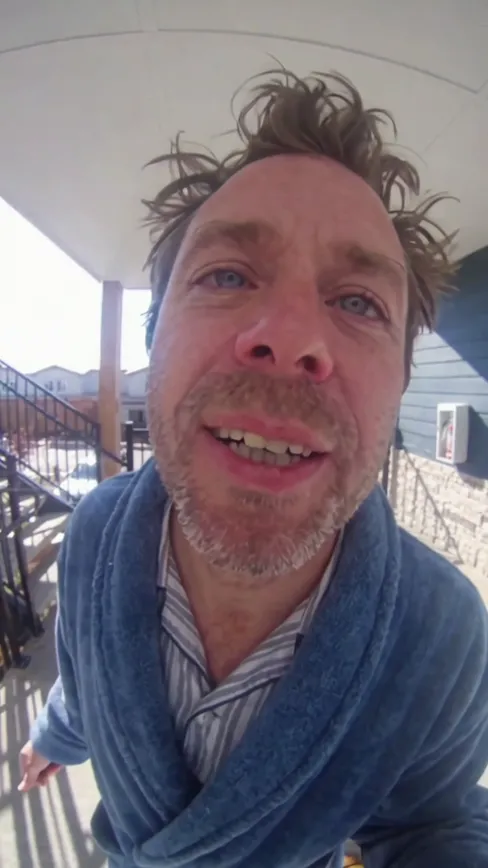
A clear person reference is enough; no real doorway or doorbell camera is needed. Mild lens distortion is part of the intended viewpoint.
284 credits per 5-second video
External visual reference, not a FYP FX-generated result. Review the preset description for its requested look and motion.
Give the doorway viewpoint a clear face reference
- Use one person with a sharp face and visible upper body.
- Show a hand clearly for the small wave.
- Prefer an unobstructed reference rather than a close phone or object in front of the face.
Sign in and check your credit balance. View credit plans.
A fixed doorbell view, a reaction and a wave
- The porch and wide-angle camera view are generated, rather than preserved from the uploaded photo.
- The intended fisheye look can coexist with unintended face or hand distortion; inspect the person separately.
- The output is a silent 5-second, 720p vertical 9:16 video.
After downloading, add a short chime before the reaction in your editor. Keep any caption away from the face near the center of the wide-angle view.
Preset details reviewed by FYP FX ·
See the doorbell framing
Give the generated porch visitor a sharp face and a readable shoulder-and-hand silhouette.
Porch-camera framing reference
A wide-angle porch view shows the close visitor framing. FYP FX generates a short approach, awkward head tilt and tiny wave from the supplied identity photo.
Vidlark ↗External visual reference, not a FYP FX-generated result. Review the preset description for its requested look and motion.
Prepare your AI Doorbell photo
The preset builds a new porch viewed from a fixed wide-angle doorbell position. Use a sharp face with visible upper body; the uploaded background and camera angle do not carry into the new scene.
Upload a clear person photo
Use one person with a sharp face and visible upper body.
Check the quote and generate once
Confirm the 284-credit quote and upload preview, then select Generate once. The sequence is preset.
Review the full sequence and download
Check the fixed viewpoint, face during the approach, head tilt and waving fingers.
Making a clear AI Doorbell clip
No. Upload one person photo. The porch, lens viewpoint and movement are generated.
No. This tool creates a silent video scene. It does not connect to a camera or provide security-device controls.
A fixed wide-angle, doorbell-style view is part of the preset. Extra facial distortion can still be a generation error, so compare the face with the source.
A silent 5-second, 720p generation costs 284 credits. Check the displayed quote and your balance before generating.
No. Download the silent clip, then add sound or music in your editor.
Check the fixed viewpoint, face during the approach, head tilt and waving fingers.
Check My videos and your balance before submitting again. Contact support if the status remains unclear.
Plan your doorbell edits
View credit plans before creating your comedy clips.
What is the AI Doorbell effect?
The AI Doorbell effect uses one adult portrait as an identity reference for a new vertical 9:16 porch scene. A fixed camera at doorbell height looks slightly downward with wide-angle edge curvature, while the visitor takes one small step closer, notices the lens, tilts the head and gives an awkward wave. The central face is intended to remain readable within the security-camera perspective. This preset is a silent fictional reaction, without a generated doorbell sound.
Give the doorway viewpoint a clear face reference
The preset builds a new porch viewed from a fixed wide-angle doorbell position. Use a sharp face with visible upper body; the uploaded background and camera angle do not carry into the new scene.
- Choose one adult with a clear face and visible shoulders in balanced light.
- A sharp solo portrait is sufficient; the porch and wide-angle perspective are generated, so the source does not need to show a doorway.
A fixed doorbell view, a reaction and a wave
- A wide-angle view can alter facial proportions and hand shapes; review the approach before the final wave.
- The preset provides one fixed porch reaction rather than a scenario selector, real security recording, branded camera interface or included doorbell audio.
The intended AI Doorbell sequence
The preset asks for these three stages. Their timing, appearance and motion may differ in the generated result.
01Step toward the doorway
The visitor takes one small step toward the fixed doorbell-camera viewpoint.
02React to the lens
A surprised look and small head tilt create the awkward pause.
03Give a tiny wave
A short wave ends the reaction while the camera remains fixed.
Finish and share your clip
After downloading, add a short chime before the reaction in your editor. Keep any caption away from the face near the center of the wide-angle view.
About the AI Doorbell effect
Do I need a doorbell camera recording?
No. Upload one person photo. The porch, lens viewpoint and movement are generated.
Does it ring a real doorbell or include camera controls?
No. This tool creates a silent video scene. It does not connect to a camera or provide security-device controls.
Why does the image look wide or curved?
A fixed wide-angle, doorbell-style view is part of the preset. Extra facial distortion can still be a generation error, so compare the face with the source.