AI Red Carpet Video: Event Walk and Flash From One Photo
Create a red-carpet scene from one photo, with two small steps, camera flashes and a posed smile. The photo guides identity in a newly generated vertical scene.
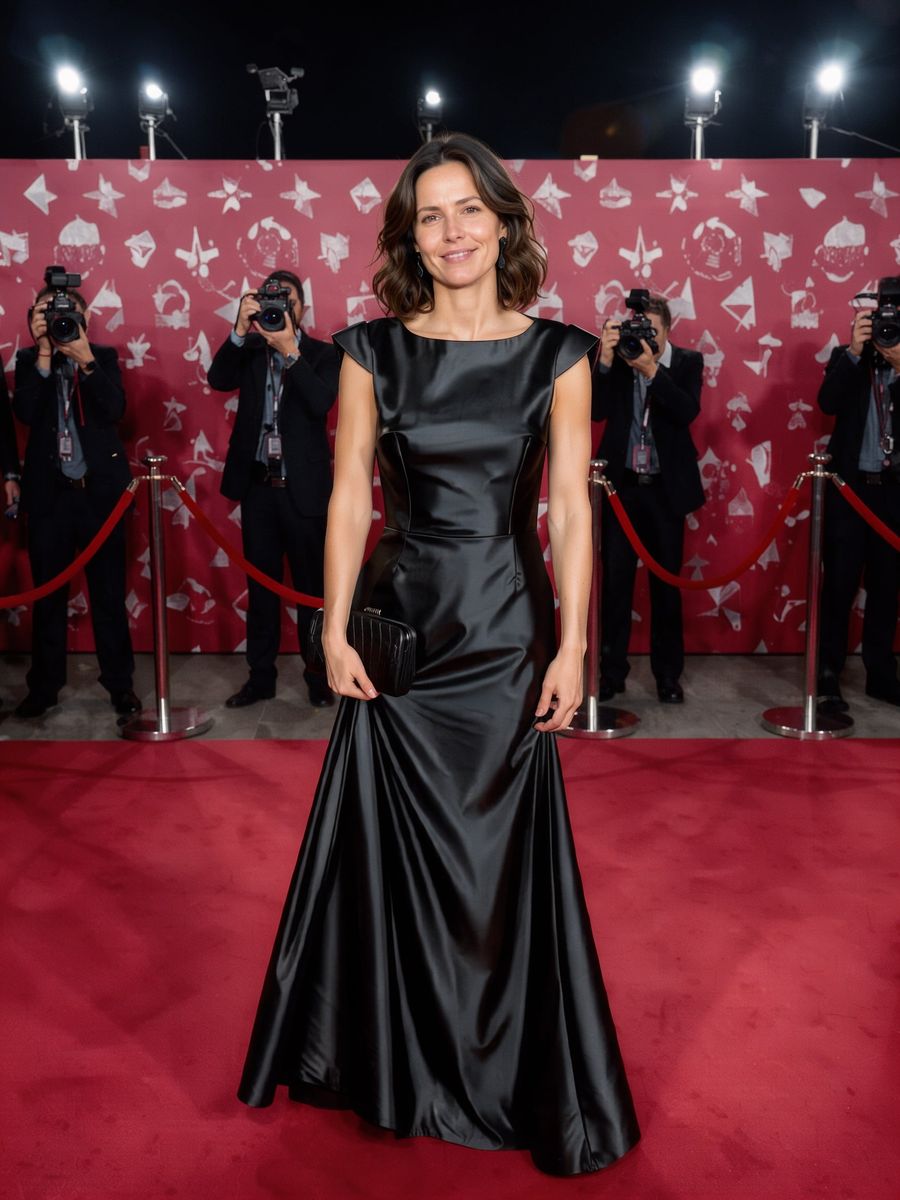
A full-body reference gives the generated walk more leg and outfit detail than a tight portrait. There is no outfit or venue selector.
284 credits per 5-second video
External visual reference, not a FYP FX-generated result. Review the preset description for its requested look and motion.
Show the full outfit for the walk and pose
- Include one person from head to shoes with a clear face.
- Keep the outfit visible, without another person crossing the body.
- Use a relaxed stance with arms and legs easy to distinguish.
Sign in and check your credit balance. View credit plans.
Two steps, flashes and a posed finish
- The red carpet, event lighting and walk are generated in a new scene, using the photo as an identity and outfit reference.
- Foot contact, hands, facial resemblance and flash exposure can vary.
- The output is a silent 5-second, 720p vertical 9:16 video.
After downloading, align short shutter sounds with the visible flashes. Keep the posed ending long enough to read.
Preset details reviewed by FYP FX ·
See the red-carpet framing
A standing full-body photo gives the short walk and final pose clear proportions.
Red-carpet composition reference
The carpet, event backdrop and ropes show the arrival setting. FYP FX keeps the reference outfit as its direction and generates two short steps, restrained flashes and a posed smile.
PixelDojo ↗External visual reference, not a FYP FX-generated result. Review the preset description for its requested look and motion.
Prepare your AI Red Carpet photo
The preset places the reference person into a new event scene. A full-body standing photo guides the outfit and proportions for two small steps and a final pose; the source location is not retained.
Upload a standing full-body photo
Include one person from head to shoes with a clear face.
Check the quote and generate once
Confirm the 284-credit quote and upload preview, then select Generate once. The sequence is preset.
Review the full sequence and download
Check both steps, shoe contact, the face during flashes and the transition into the final pose.
Making a clear AI Red Carpet clip
No. The preset uses a generic event scene and asks to retain the reference outfit. There is no venue or outfit menu.
A portrait can omit the legs and clothing needed for the walk. A full-body standing reference better matches this preset.
No celebrity is selected. The preset asks for the uploaded person, but generated faces and outfit details can still change.
A silent 5-second, 720p generation costs 284 credits. Check the displayed quote and your balance before generating.
No. Download the silent clip, then add sound or music in your editor.
Check both steps, shoe contact, the face during flashes and the transition into the final pose.
Check My videos and your balance before submitting again. Contact support if the status remains unclear.
Plan your red-carpet edits
View credit plans before creating your lifestyle clips.
What is the AI Red Carpet effect?
The AI Red Carpet effect uses one adult photo as an identity and outfit reference for a new vertical 9:16 event entrance. The person takes two short steps along a generic red carpet as the camera tracks backward, receives two soft photographer flashes, then stops and poses with a smile. The intended result keeps the whole body and shoes visible; the carpet, ropes and unbranded event backdrop are generated.
Show the full outfit for the walk and pose
The preset places the reference person into a new event scene. A full-body standing photo guides the outfit and proportions for two small steps and a final pose; the source location is not retained.
- Prefer one adult shown head to toe with a sharp face, a clearly readable outfit and separated shoes.
- A neutral standing reference helps the model infer a short walk. The source does not need to contain an event carpet or photographers.
Two steps, flashes and a posed finish
- Foot contact, outfit detail and facial features can shift during the walk or flashes. Check the transition from moving to stopped feet.
- The preset creates a generic event arrival with your appearance as a guide, without reproducing a real awards show, venue or celebrity sighting.
The intended AI Red Carpet sequence
The preset asks for these three stages. Their timing, appearance and motion may differ in the generated result.
01Take two small steps
The person moves a short distance along the generated red carpet.
02Keep moving through the flashes
Brief camera flashes appear while the person stays readable.
03Stop and pose
The walk ends in a simple smiling pose toward the camera.
Finish and share your clip
After downloading, align short shutter sounds with the visible flashes. Keep the posed ending long enough to read.
About the AI Red Carpet effect
Can I choose an award show, venue or designer outfit?
No. The preset uses a generic event scene and asks to retain the reference outfit. There is no venue or outfit menu.
Will a portrait work as well as a full-body photo?
A portrait can omit the legs and clothing needed for the walk. A full-body standing reference better matches this preset.
Does it turn me into a celebrity?
No celebrity is selected. The preset asks for the uploaded person, but generated faces and outfit details can still change.