Shaking Head AI Video: Smug Head Shake From One Photo
Animate one adult, dog or cat photo with a slow side-to-side head shake, a playful expression and a small tongue-tip finish. The uploaded photo supplies the opening frame.
Use a front-facing or slight three-quarter face with room at both sides. Dogs and cats are the supported pet references for this preset.
284 credits per 5-second video
External visual reference, not a FYP FX-generated result. Review the preset description for its requested look and motion.
Choose one adult, dog or cat with a clear face
- Show one adult person, one dog or one cat with a sharp face.
- Keep the whole head and neck in view, including ears or muzzle where relevant.
- Leave some space beside the head and avoid hands or objects covering the mouth.
Sign in and check your credit balance. View credit plans.
A slow head-shake cycle and playful finish
- This preset supports one adult, dog or cat; it does not offer other animal or group modes.
- Eyes, tongue, muzzle, teeth or facial identity can distort during the expression change.
- The output is silent and keeps the source photo’s aspect ratio.
After downloading, time a short reaction sound to the final expression. If you want only the head shake, trim before the tongue-tip ending in your editor.
Preset details reviewed by FYP FX ·
See the smug head-shake framing
Keep the eyes and mouth or muzzle sharp enough to judge the small expression change.
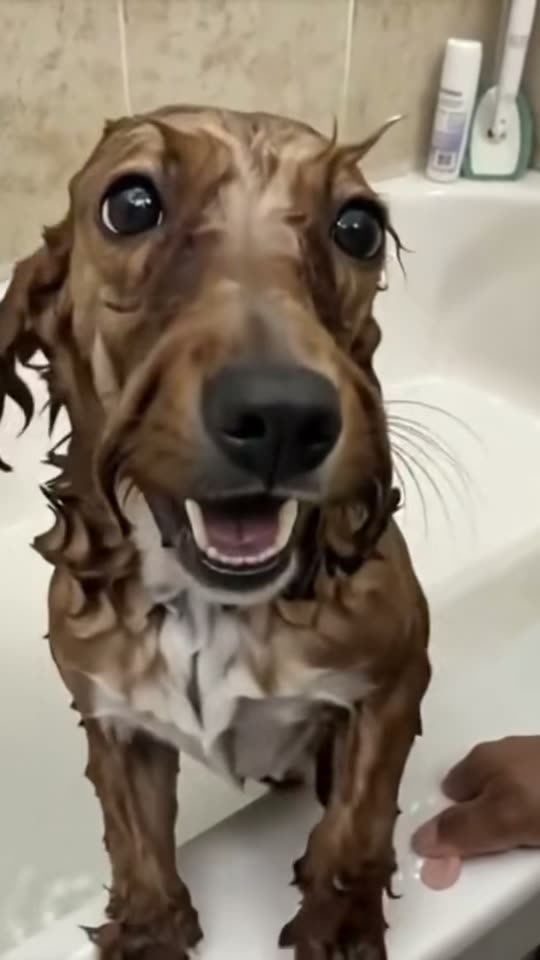
Dog-face detail reference
Clear eye and muzzle detail provides an expression reference. FYP FX requests a gentle head-shake cycle and a brief natural tongue tip from one adult, dog or cat photo.
MakeViral ↗External visual reference, not a FYP FX-generated result. Review the preset description for its requested look and motion.
Prepare your AI Shaking Head photo
This preset starts from your photo and is limited to one adult person, dog or cat. Keep the head and neck visible with a little side space so the small left-right movement can be generated without a tight crop.
Upload one adult, dog or cat photo
Show one adult person, one dog or one cat with a sharp face.
Check the quote and generate once
Confirm the 284-credit quote and upload preview, then select Generate once. The sequence is preset.
Review the full sequence and download
Check the head and neck connection, one slow left-right cycle, eye shape and the tongue-tip finish.
Making a clear AI Shaking Head clip
This preset is written for one dog or cat, or one adult person. Other species are outside its intended subject set.
The preset asks to retain the source background and subject, including species cues and markings. AI can still alter details, so compare the result with the photo.
No. The head shake and expression are fixed. You can trim the downloaded clip in your editor.
A silent 5-second, 720p generation costs 284 credits. Check the displayed quote and your balance before generating.
No. Download the silent clip, then add sound or music in your editor.
Check the head and neck connection, one slow left-right cycle, eye shape and the tongue-tip finish.
Check My videos and your balance before submitting again. Contact support if the status remains unclear.
Plan your Shaking Head edits
View credit plans before creating your comedy clips.
What is the AI Shaking Head effect?
The AI Shaking Head effect animates one adult, dog or cat photo: a small smug squint leads into one slow left-right head-shake cycle, then the eyes open playfully and a tongue tip briefly appears. The uploaded image supplies the opening frame, crop and setting. The body stays nearly still so the expression is the main action, with a natural muzzle and mouth for cats and dogs.
Choose one adult, dog or cat with a clear face
This preset starts from your photo and is limited to one adult person, dog or cat. Keep the head and neck visible with a little side space so the small left-right movement can be generated without a tight crop.
- Use one adult, dog or cat with the eyes and mouth or muzzle visible in even light.
- Leave space beside the head for the small turn. Avoid sunglasses, hair over the eyes, deep profiles or an open-mouthed source pose.
A slow head-shake cycle and playful finish
- The intended expression is subtle, but eye shapes, teeth and tongue details can change; inspect the mouth as the head settles.
- This preset supports a single adult or a dog or cat. Other species and groups are outside its intended input, and output is silent.
The intended AI Shaking Head sequence
The preset asks for these three stages. Their timing, appearance and motion may differ in the generated result.
01Start the slow shake
The preset adds a narrowed-eye expression and begins a small turn to one side.
02Turn to the other side
The head completes one slow side-to-side cycle without a large body movement.
03Settle with a tongue tip
The head settles while the eyes open more and a small tongue tip appears.
Finish and share your clip
After downloading, time a short reaction sound to the final expression. If you want only the head shake, trim before the tongue-tip ending in your editor.
About the AI Shaking Head effect
Can I use any animal photo?
This preset is written for one dog or cat, or one adult person. Other species are outside its intended subject set.
Does it replace the background or change the subject’s species?
The preset asks to retain the source background and subject, including species cues and markings. AI can still alter details, so compare the result with the photo.
Can I change the expression or remove the tongue-tip ending?
No. The head shake and expression are fixed. You can trim the downloaded clip in your editor.