Airport Paparazzi Video: Terminal Walk and Flash From One Photo
Create an airport arrival scene from one photo, with a short suitcase walk, soft camera flashes and a knowing smile. The photo guides identity in a newly generated vertical scene.
You do not need a suitcase or airport in the photo. A visible empty hand and clear full-body stance better match the generated walk.
284 credits per 5-second video
External visual reference, not a FYP FX-generated result. Review the preset description for its requested look and motion.
Show the person and outfit for the suitcase walk
- Use one clear person with the full outfit and both shoes visible.
- Keep at least one hand unobstructed for the suitcase handle.
- Avoid another person or a large held object overlapping the body.
Sign in and check your credit balance. View credit plans.
A suitcase walk, flashes and a moving finish
- The terminal, suitcase and walking action are generated rather than taken from the reference background.
- Suitcase grip, wheel contact, leg motion and face detail can become inconsistent.
- The output is a silent 5-second, 720p vertical 9:16 video.
After downloading, add terminal ambience or a few shutter sounds in your editor. Trim on a clear step rather than a frozen frame if you want to preserve the moving finish.
Preset details reviewed by FYP FX ·
See the airport framing
Show the face, arms and shoes clearly so the suitcase handle and walking motion have useful references.
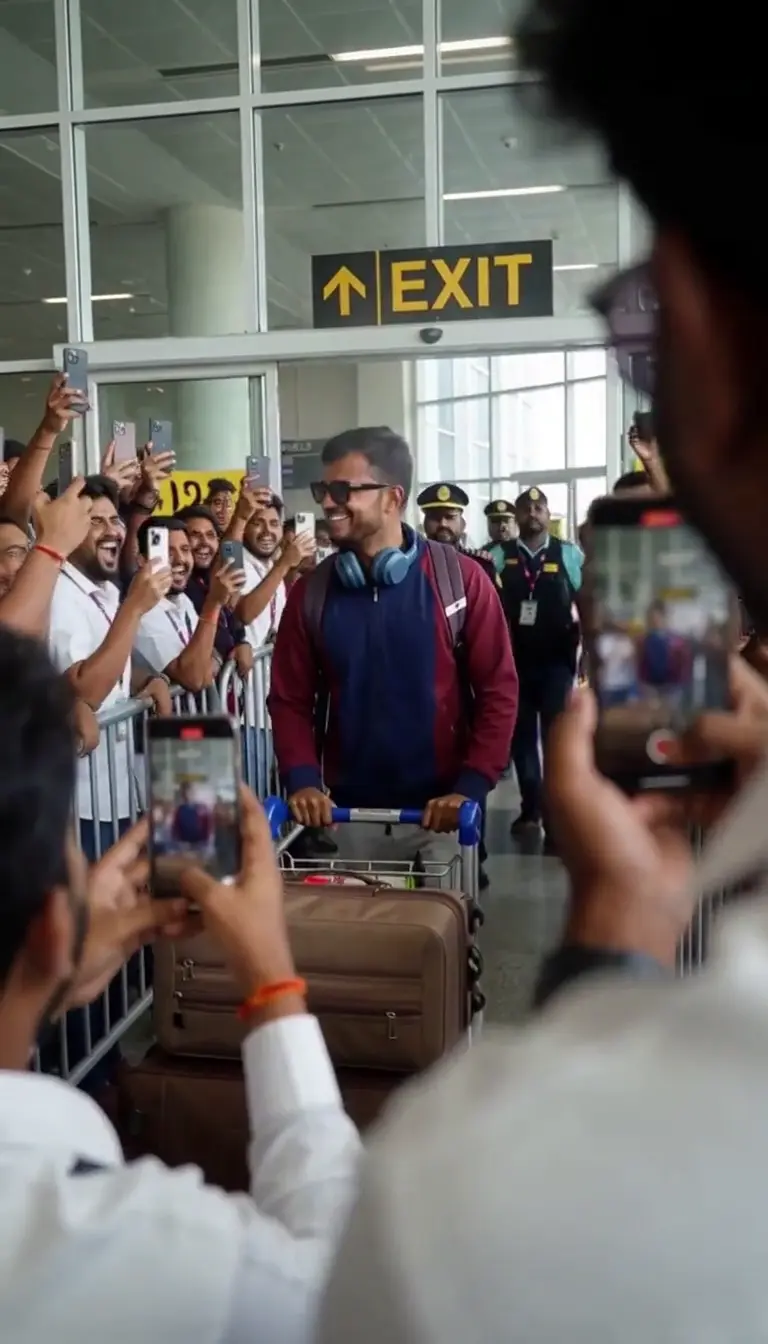
Terminal-arrival scene reference
A terminal arrival with a rolling suitcase illustrates the setting. FYP FX generates a simpler continuous walk with distant travelers and soft off-camera flashes.
Kavel AI ↗External visual reference, not a FYP FX-generated result. Review the preset description for its requested look and motion.
Prepare your Airport Paparazzi photo
The preset builds a new terminal scene with an unmarked suitcase. A full-body standing reference helps the walk, while a clear face and visible hands help the suitcase grip.
Upload a clear full-body photo
Use one clear person with the full outfit and both shoes visible.
Check the quote and generate once
Confirm the 284-credit quote and upload preview, then select Generate once. The sequence is preset.
Review the full sequence and download
Check the hand-to-handle grip, suitcase wheels, walking feet and face under the flashes.
Making a clear Airport Paparazzi clip
No. The reference supplies the person and outfit. The terminal and suitcase are generated.
No. The preset builds a generic terminal and has no travel or location selector.
This preset asks the person to keep walking through the ending. AI Red Carpet is the option built around a stationary final pose.
A silent 5-second, 720p generation costs 284 credits. Check the displayed quote and your balance before generating.
No. Download the silent clip, then add sound or music in your editor.
Check the hand-to-handle grip, suitcase wheels, walking feet and face under the flashes.
Check My videos and your balance before submitting again. Contact support if the status remains unclear.
Plan your airport edits
View credit plans before creating your lifestyle clips.
What is the Airport Paparazzi effect?
The Airport Paparazzi effect uses one adult photo as an identity and outfit reference for a new vertical 9:16 terminal scene. The person walks forward pulling one unmarked rolling suitcase while the camera tracks backward, receives two soft off-camera flashes and briefly glances toward the lens. The stride continues to the end instead of freezing for a pose. The terminal, suitcase and any distant blurred travelers are generated around the main subject.
Show the person and outfit for the suitcase walk
The preset builds a new terminal scene with an unmarked suitcase. A full-body standing reference helps the walk, while a clear face and visible hands help the suitcase grip.
- Prefer one adult in a neutral standing full-body photo with a sharp face and visible arms and shoes.
- Keep the outfit and silhouette unobstructed; you do not need a suitcase, boarding pass or airport background in the reference photo.
A suitcase walk, flashes and a moving finish
- The suitcase handle can lose contact with the hand or wheels can slide. Review the bag and feet together as the camera tracks backward.
- The clip is a fictional terminal walk with generated surroundings, without a real travel record, known airline, exact location or celebrity appearance.
The intended Airport Paparazzi sequence
The preset asks for these three stages. Their timing, appearance and motion may differ in the generated result.
01Start the suitcase walk
The person takes small forward steps while pulling an unmarked suitcase.
02Walk through the flashes
Soft flashes appear as the walk continues through the generated terminal.
03Continue with a small smile
The person keeps moving rather than stopping for a stationary pose.
Finish and share your clip
After downloading, add terminal ambience or a few shutter sounds in your editor. Trim on a clear step rather than a frozen frame if you want to preserve the moving finish.
About the Airport Paparazzi effect
Do I need an airport photo or a suitcase?
No. The reference supplies the person and outfit. The terminal and suitcase are generated.
Can I choose an airline, airport or flight?
No. The preset builds a generic terminal and has no travel or location selector.
Does the person stop for a pose?
This preset asks the person to keep walking through the ending. AI Red Carpet is the option built around a stationary final pose.