Halloween Dance Generator: Orange Cape and Two Side Steps
Upload one full-body standing adult photo. Your photo opens the clip, then the preset adds an opaque black top and trousers with a short pumpkin-orange cape before a shoulder bounce, two compact side steps and a smiling pose.
Use one clear full-body standing adult with both shoes and room on each side. The opening uses your photo, so a tight crop cannot provide the required foot framing.
284 credits per 5-second video
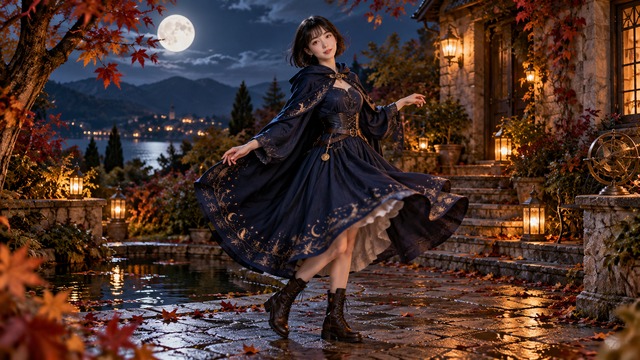
External Halloween pose illustration, not a FYP FX-generated result. The pictured outfit differs from the fixed black outfit and short orange cape used by this preset.
Check the face, shoes and side space
- Use exactly one standing adult with a clear face and full body visible.
- Include both shoes and open space on each side for the outward and return steps.
- Keep arms clear of the face and body; a costume photo is not required.
Sign in and check your credit balance. View credit plans.
Review the bounce, steps and pose hold
- The source photo is the opening frame. A tight crop cannot provide the required shoes or side space; the camera is intended to stay steady.
- The fixed look is an opaque black top and trousers with a short pumpkin-orange back cape, low collar and no hat or mask. The cape ends above the knees and leaves the arms free. Cape edges, hands, foot contact and background details can distort.
- The output is silent, 5 seconds and 720p, and follows your photo’s aspect ratio. There is no costume menu, choreography control or song selector.
Download first, then align sound with the actual steps in your editor. Review the opening transition before making a loop, and keep captions away from the face and feet.
Preset details reviewed by FYP FX ·
See full-body Halloween pose framing
Keep the face, both shoes and room for a short step readable in the source photo.
Full-body Halloween pose reference
This external illustration shows a full-body Halloween pose with both boots visible. Its navy outfit differs from the fixed black outfit and short orange cape requested by FYP FX. It does not demonstrate the generated transition or dance.
SuperMaker ↗External Halloween pose illustration, not a FYP FX-generated result. The pictured outfit differs from the fixed black outfit and short orange cape used by this preset.
Prepare the reference and review the dance
Start with one clear full-body standing adult, then check the cape transition, both side steps and the final pose.
Choose one clear full-body photo
Use one standing adult with a sharp face, both shoes visible and open space on each side.
Check the quote and generate once
Confirm the 284-credit quote, then select Generate once. The opening costume transition and short dance are fixed.
Review the steps and pose hold
Review the outfit transition, both side steps, foot contact and final smile. Download the silent clip before adding audio.
Making a clear Halloween Dance clip
Your uploaded photo is the opening frame. The preset then requests an opaque black top and trousers with a short pumpkin-orange cape before the dance. It uses a steady camera and your photo’s aspect ratio; background and facial details can still drift.
One fixed look: an opaque black top and trousers with a short pumpkin-orange back cape. The cape has a low collar, ends above the knees and leaves the arms free. There is no hat or mask; the costume should stay the same after the opening transition.
No. The output is silent. Download the clip, then add a track you have permission to use in your editor.
A silent 5-second, 720p generation costs 284 credits. Each new generation is another paid attempt, including retries for a different result. Check the displayed quote and your balance before generating.
No. The black outfit, orange cape, shoulder bounce and two short side steps are fixed preset instructions. There is no costume menu or choreography control.
Check the opening outfit transition, facial likeness, planted feet through both side steps, hand clearance and cape continuity. The person should return toward center and finish in a clear smiling pose.
Check My videos and your balance before submitting again. Contact support if the status remains unclear; starting another generation can incur another 284-credit charge.
Plan your Halloween video edits
Check credit plans before creating additional dance clips.
What is the Halloween Dance effect?
Halloween Dance animates one full-body adult photo from its opening frame. The preset first requests an opaque black top and trousers with a short pumpkin-orange cape, then a shoulder bounce, one short side step, a step back toward center and a smiling pose. It uses a steady camera and the source photo’s aspect ratio. The output is a silent 5-second, 720p clip for 284 credits.
Give the side steps room to read
Use one full-body standing adult with a clear face, both shoes and open side space. The source photo opens the clip and sets its framing and aspect ratio. A costume photo is not required; the preset requests an opaque black top and trousers with a short pumpkin-orange cape.
- Use one full-body standing adult with a clear face, both shoes visible and open space on each side for the outward and return steps.
- Keep arms clear of the face and body. A costume photo is not required; the uploaded photo is the opening frame, so avoid crops that hide the feet.
A cape transition, then two compact side steps
- The outfit transition, facial likeness, cape edges, hands, foot contact and background details are generated and can distort. Exact timing and motion may vary.
- The fixed look is an opaque black top and trousers with a short pumpkin-orange back cape and low collar, without a hat or mask. The cape ends above the knees and leaves the arms free. There is no costume selector, choreography control or included song. The camera is intended to stay steady rather than making a walk-and-reveal move.
The intended festive dance sequence
The intended sequence changes the outfit first, then adds a shoulder bounce, one short step outward, a step back toward center and a smiling pose. The camera stays steady instead of making a walk-and-reveal move. Timing and motion may vary.
01Transition into the cape and first step
During the first second, the photo’s outfit changes into an opaque black top and trousers with a short pumpkin-orange cape. A small shoulder bounce and one short sideways step follow at about 1–2.5 seconds.
02Sway and step back toward center
At about 2.5–4 seconds, the person makes a light arm sway at chest height and one short side step back toward center. Hands stay clear of the face and both shoes stay in frame.
03Hold the festive pose
At about 4–5 seconds, the person holds a clear pose with a small friendly smile. The black outfit and orange cape stay consistent after the opening transition.
Finish and share your clip
After downloading, align your chosen track with the actual side steps. Keep captions and stickers off the face and feet, and check the cape transition before looping the clip.
About the Halloween Dance effect
Does it build a new camera scene?
The uploaded photo is the opening frame. The preset asks for a steady view of the original setting with subtle pumpkin-coloured light, rather than a new low-camera walk scene. Generated background details may still change.
Can the cape or dance be changed?
No. The fixed look is an opaque black top and trousers with a short pumpkin-orange cape, without a hat or mask. The shoulder bounce, short side step, return step and final pose are fixed instructions.
Can I use a cropped portrait or a group?
Use exactly one adult in a full-body standing photo. Both shoes and side space need to be visible in the opening frame; a waist-up crop cannot supply the required foot framing.
How is this different from Costume Walk?
Costume Walk creates a new low-camera cape reveal. Halloween Dance starts from your photo, changes the outfit, then requests compact side steps in a steady shot. Both produce silent clips; add audio after downloading.