AI Charme Dance Video: A Short Baile Groove From One Photo
Upload one full-body standing photo. The preset asks for a relaxed knee bounce, side steps right and left, low arm swings and a short rock into a smile.
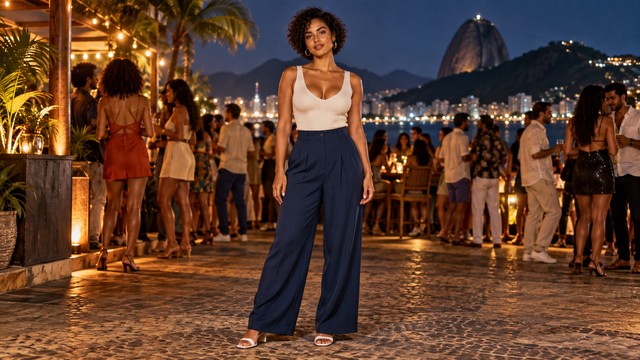
Include both shoes, visible ground and room to either side for the small steps. Keep the arms clear of the torso so the low swing can read.
284 credits per 5-second video
External visual reference, not a FYP FX-generated result. Review the preset description for the requested look and motion.
Check the floor, shoes and space at both sides
- Include one person from head to shoes on a visible, level surface.
- Leave a little room at both sides for the side steps.
- Keep the arms visible and clear of the torso for the low swing.
Sign in and check your credit balance. View credit plans.
Watch the footwork and finishing balance
- Side-step timing, knee bends, arm swings and facial details are generated and can vary.
- This is a short groove inspired by baile charme, without an exact routine or song synchronization control.
- The output is silent and keeps the source aspect ratio.
Trim after the final rock if you want a shorter edit. Add and align music in your editor after downloading.
Preset details reviewed by FYP FX ·
See the soft charm framing
Use a head-to-toe photo with a level floor for the side-step groove.
Charme scene reference
A solo dance scene on an open promenade. Keep the feet and floor visible for the preset’s compact side-step groove.
SuperMaker ↗External visual reference, not a FYP FX-generated result. Review the preset description for the requested look and motion.
Prepare a clear charme take
Start with a standing full-body photo, then check the side steps and balance.
Upload a standing full-body photo
Use one person with a clear face, both shoes and headroom.
Generate the side-step groove
Confirm the 284-credit cost, then select Generate once. The knee bounce, side steps and low arm swing are preset.
Review the steps and balance
Check foot contact and the finishing pose, then download and add audio in your editor.
Making a clear Charme Dance clip
No. The preset uses a short baile-charme-inspired groove with side steps and low arm swings. It does not reproduce a specific performance, reference video or song.
This preset is designed for one standing person. A group photo can mix faces, limbs or footwork; use one clear subject.
No. The preset starts from your photo and asks to retain the location and outfit. Background and clothing details can still change.
A silent 5-second, 720p generation costs 284 credits. Check the displayed cost and your balance before generating.
The video is silent and is not synchronized to a particular song. Add audio and adjust its timing in your editor after downloading.
Check the side-to-side footwork, knee bends and low arm swings. Compare the face with the original at the start and finish.
Check generation history and balance before submitting again, and contact support if the status stays unclear.
Plan your dance edits
View credit plans before creating your dance clips.
What is the AI Charme Dance effect?
The AI Charme Dance effect animates one standing photo into a short Brazilian baile-charme-inspired groove. Relaxed knees and a shoulder bounce lead into one side step right and back left, with the hands swinging low near the waist, then a small weight rock and smile. It keeps the photo's setting as the intended backdrop; it does not copy a viral street-party recording, its crowd or its soundtrack.
Leave room for the side steps and low arm swing
The preset moves right, gathers the feet, then moves left with low arm swings. Show the whole person on flat ground, with some free floor to each side and arms separated from the torso.
- Use one standing person from head to shoes on flat ground, with enough space on each side for a compact step.
- Keep the hands visible near waist level and separate the shoes from the background; avoid crossed legs or overlapping people.
Relaxed bounce, side steps and a finishing rock
- Step timing, foot contact and shoulder rhythm can vary. Check whether the supporting foot slides or the legs cross unexpectedly.
- This is a five-second solo adaptation of a relaxed soul/R&B-style groove, without a viral party scene, exact recorded routine or soundtrack.
The Charme groove has three short sections
This preset requests a compact baile-charme-inspired groove. It animates your photo rather than reconstructing a party scene or a specific performer’s routine.
01Relax the knees and find the groove
The preset starts with soft knees and a small shoulder bounce in the original setting.
02Step right, then left
A small side step and feet-together movement repeats to the other side, with low arm swings.
03Rock and settle
A small forward-and-back rock ends in a balanced smiling hold.
Finish and share your clip
After downloading, align your chosen rhythm to the side steps in your editor. The silent clip has no included track or automatic beat matching.
What makes this an AI Charme Dance effect?
Is audio included?
No. Add a cleared track after download.
Why keep the gesture small?
Small side steps are intended to stay within the source framing. Leave some floor to either side and check for sliding feet or movement out of shot.
Can I use a mirror selfie?
A full-body mirror photo can be uploaded, but a phone covering the face or hands can interfere with this gesture. A clear standing photo without an obstruction better matches the preset.