AI Dolly Zoom Video: Hitchcock Vertigo Move From One Photo
Upload one photo with a clear person and depth behind them. The preset aims to keep the subject roughly steady while the background changes perspective, then settles into a hold.
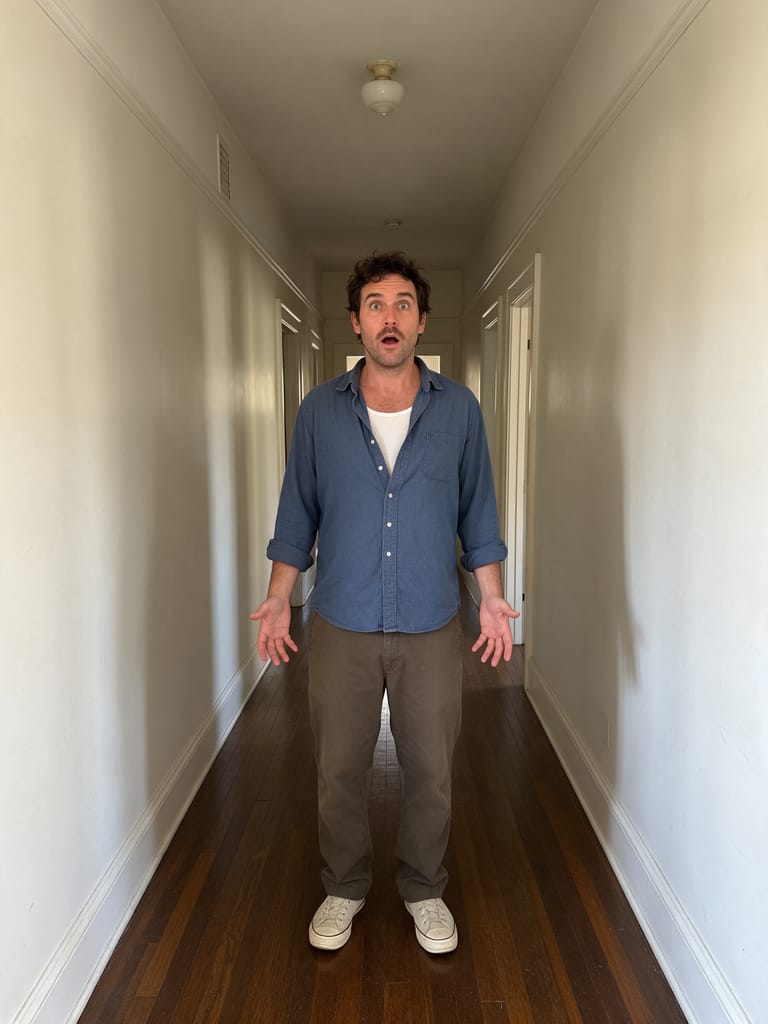
Photos with some background depth (hallway, street, room) show the warp more clearly than flat walls.
284 credits per 5-second video
External visual reference, not a FYP FX-generated result. Review the preset description for the requested look and motion.
Check subject center and background depth
- Center one person in a medium shot with a sharp face.
- Show depth behind them, such as a corridor, receding street or layered room.
- Avoid a flat wall, heavy blur or a very tight face-only crop.
Sign in and check your credit balance. View credit plans.
Watch face sharpness through the warp
- The generated camera effect can bend background lines, alter subject size or soften the face.
- There is no lens, focal length or warp-strength control; this is a fixed visual preset.
- The output is silent and keeps the source aspect ratio.
For a cinematic post, trim as the warp peaks and add a short whoosh.
Preset details reviewed by FYP FX ·
See the dolly-zoom framing
A clear subject against receding background lines makes the perspective change easier to read.
Hallway depth reference
A centered subject and receding hallway show the depth needed for a simulated dolly zoom. This is the source site’s input photo.
PixelDojo ↗External visual reference, not a FYP FX-generated result. Review the preset description for the requested look and motion.
Prepare a clear dolly-zoom take
Start with a centered subject and depth, then check the warp.
Upload a photo with depth
Use one clear subject and a background with some depth.
Generate the dolly zoom
Confirm the 284-credit cost, then select Generate once. The camera move is preset.
Review the warp
Check face sharpness through the stretch, then download and add audio.
Making a clear Dolly Zoom clip
No. The camera movement is generated from one still photo. A portrait with visible depth behind the person gives the effect more scene information to work with.
Not always. The preset asks for a sharp, centered face, but AI can soften or reshape it as the background changes. Check the face throughout the clip.
A clear medium shot or portrait with background depth works well.
A silent 5-second, 720p generation costs 284 credits. Check the displayed cost and your balance before generating.
The output is silent. Add a low drone or whoosh after downloading.
The intended look keeps the subject roughly the same size while the background changes around them. If the whole image only grows larger, the result has missed that distinction.
Check generation history and balance before submitting again, and contact support if the status stays unclear.
Plan your cinematic edits
View credit plans before creating your cinematic clips.
What is the AI Dolly Zoom effect?
The AI Dolly Zoom effect starts from the uploaded framing, then moves the virtual camera forward while widening its field of view. These opposing changes aim to keep the subject approximately the same size and position while the background perspective changes, ending in a hold of the new view. The intended effect comes from camera perspective, without buildings bending or the background snapping back.
Give the warp some background depth
A dolly-zoom reads best when the background has depth the perspective can stretch. A centered subject with a hallway, street or room behind them works well.
- Use one clear person with visible depth behind them, such as a hallway, street or room; a centered composition is easier to inspect.
- Keep the starting crop you want to use. A flat wall, heavy blur or a very tight face crop gives the model less background depth to work with.
Steady subject, stretching background
- The model infers depth from one flat image, so face scale, straight background edges and perspective can drift.
- This is a generated camera-effect approximation, without a measured lens path or a guaranteed match to a specific film shot.
The dolly zoom happens in three beats
The preset requests a stable opening, a background perspective change and an ending hold. This is an AI approximation of the camera effect, so scene geometry and facial details can shift.
01Stable opening hold
The uploaded framing establishes the subject before the camera move.
02Push-in with widening field
The simulated camera move aims to keep the subject at a similar size while changing the background perspective.
03Eased final frame
The generated move slows into a hold at the new perspective, without a return to the opening view.
Finish and share your clip
After downloading, add a rising tone during the perspective change. If you want a longer pause before the move, add a still of the original photo in your editor.
What makes this an AI Dolly Zoom effect?
Is the camera move physically exact?
No. The tool generates a visual approximation from a photo. Background lines, edges and depth can deform rather than behaving like a real lens and camera.
Why does depth matter?
Flat backgrounds hide the perspective stretch.
Can the face change during the move?
Yes. The preset asks to retain the person, but identity and facial detail can drift. Review the face as well as the background before keeping the clip.