AI Enchantress Video: Witch Look Transformation From One Photo
Transform one portrait into a fantasy enchantress look with sparkles, a dark cloak and subtle makeup, followed by a small pose. The uploaded photo supplies the opening frame.
Include the shoulders and torso rather than only the face. The cloak is a generated costume change; there is no costume menu or hat selector.
284 credits per 5-second video
External visual reference, not a FYP FX-generated result. Review the preset description for its requested look and motion.
Leave room for the cloak around the upper body
- Use one clear person with face, shoulders and some torso visible.
- Leave space beside the shoulders for cloak fabric.
- Keep the face, neck and shoulders unobstructed by other people or held objects.
Sign in and check your credit balance. View credit plans.
Sparkles, a cloak transformation and a final pose
- The cloak, makeup, chin movement and facial detail are generated and can change the source appearance.
- This is a fixed fantasy look without a named-character, hat or costume selector.
- The output is silent and keeps the source photo’s aspect ratio.
After downloading, add a soft sparkle or transition sound as the cloak forms. A still of the source photo can extend the before view in your editor.
Preset details reviewed by FYP FX ·
See the witch-look framing
A clear face and visible shoulders help the cloak and subtle makeup reveal stay readable.
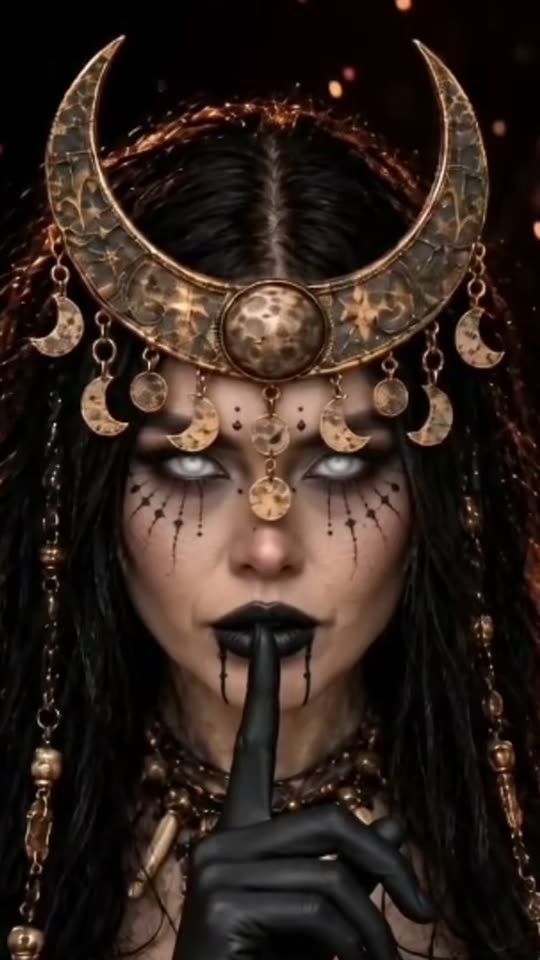
Dark-fantasy costume reference
An external moon-witch styling reference with a detailed headdress. FYP FX uses its own simpler dark-cloak and smoky-eye reveal, keeping the head uncovered.
MakeViral ↗External visual reference, not a FYP FX-generated result. Review the preset description for its requested look and motion.
Prepare your AI Enchantress photo
This preset starts from the uploaded photo. Keep the face sharp and include the neck, shoulders and torso so the cloak can form over the existing outfit and the small chin lift stays readable.
Upload a clear upper-body photo
Use one clear person with face, shoulders and some torso visible.
Check the quote and generate once
Confirm the 284-credit quote and upload preview, then select Generate once. The sequence is preset.
Review the full sequence and download
Check the face, continuous clothing coverage, cloak edges, and neck-and-collar continuity through the small chin lift.
Making a clear AI Enchantress clip
No. The preset uses a generic fantasy cloak and makeup, with no character selector.
The preset requests a continuous, fully covered costume transformation. Review the fabric and body outline because AI can still produce unintended changes.
Enchantress focuses on a dark cloak, sparkles and subtle makeup. Halloween Costume Transformation uses a grey robe, orange trim and a plain witch hat.
A silent 5-second, 720p generation costs 284 credits. Check the displayed quote and your balance before generating.
No. Download the silent clip, then add sound or music in your editor.
Check the face, continuous clothing coverage, cloak edges, and neck-and-collar continuity through the small chin lift.
Check My videos and your balance before submitting again. Contact support if the status remains unclear.
Plan your witch-look edits
View credit plans before creating your fantasy clips.
What is the AI Enchantress effect?
The AI Enchantress effect begins with the uploaded adult photo, then gathers teal and violet sparkles around the shoulders as the clothes become one opaque dark cloak with silver trim. Subtle smoky eye makeup appears and a small chin lift and smile complete the reveal. The transformation aims to keep the face uncovered, clothing continuously covering the body, and the original background and crop as the base.
Leave room for the cloak around the upper body
This preset starts from the uploaded photo. Keep the face sharp and include the neck, shoulders and torso so the cloak can form over the existing outfit and the small chin lift stays readable.
- Use one adult with a sharp face, visible hairstyle and clearly separated shoulders in even light.
- A shoulder-up or waist-up portrait gives the cloak a readable outline. Leave some space around the collar rather than using an extreme face crop.
Sparkles, a cloak transformation and a final pose
- Cloak edges, collar joins, makeup and facial details can change during the morph; inspect the neck and shoulders as the fabric settles.
- The fixed look is a generic dark-cloak enchantress with an uncovered head. It does not provide named character costumes, outfit selection or a guaranteed likeness.
The intended AI Enchantress sequence
The preset asks for these three stages. Their timing, appearance and motion may differ in the generated result.
01Sparkles gather
A few soft sparkles appear near the shoulders and hair while the person remains covered.
02The cloak and makeup form
The outfit changes continuously into a generic dark cloak with subtle fantasy makeup.
03Lift the chin and hold
A small chin lift and confident smile lead into the final hold as the sparkles settle.
Finish and share your clip
After downloading, add a soft sparkle or transition sound as the cloak forms. A still of the source photo can extend the before view in your editor.
About the AI Enchantress effect
Can I choose a particular comic or film character?
No. The preset uses a generic fantasy cloak and makeup, with no character selector.
Does the effect remove clothing during the change?
The preset requests a continuous, fully covered costume transformation. Review the fabric and body outline because AI can still produce unintended changes.
How is this different from Halloween Costume Transformation?
Enchantress focuses on a dark cloak, sparkles and subtle makeup. Halloween Costume Transformation uses a grey robe, orange trim and a plain witch hat.