AI Fireworks Video Generator: Add Bursts to Your Photo
Upload one photo with a clear main subject and open sky above. Check the preview and 284-credit quote, then create a five-second celebration clip with fireworks in the background.
Choose a clear photo with open sky above the subject. A wider composition gives the bursts more room without competing with the face.
284 credits per 5-second video
External reference images from SuperMaker, not FYP FX-generated results. They illustrate composition; the preset does not include a skyline selector or guarantee these burst shapes.
Check the face and the space above it
- Choose a sharp photo with one clear main subject and a readable face.
- Leave unobstructed sky above the head; avoid a low ceiling, dense branches or a tight face crop.
- Use a portrait photo for a vertical clip. The output follows the source photo’s aspect ratio rather than an in-app crop setting.
- A simple outdoor background can make it easier to inspect whether bursts stay behind the subject.
Sign in and check your credit balance. View credit plans.
Check the subject during the brightest burst
- A tight crop leaves less space for fireworks. The preset does not offer an outpainting control to extend your frame.
- Burst shapes, sparks, facial details and background lighting can distort or flicker. Review the whole clip for effects crossing the face.
- The silent 5-second video is 720p and follows your photo’s aspect ratio. There is no color palette, skyline, countdown or soundtrack selector.
Download the video and align music or firework sounds with the brightest burst in your editor. Place greetings below the main sky area and check the final crop before sharing.
Preset details reviewed by FYP FX ·
Give the celebration room above the subject
Use these fireworks compositions to judge how a clear subject and open sky can share the same frame.
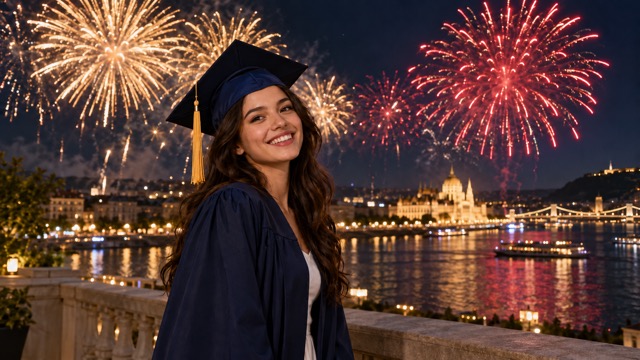
Graduation fireworks composition
A readable graduation portrait sits beneath colorful bursts over a river. Leave similar space above the head when preparing your own photo.
SuperMaker ↗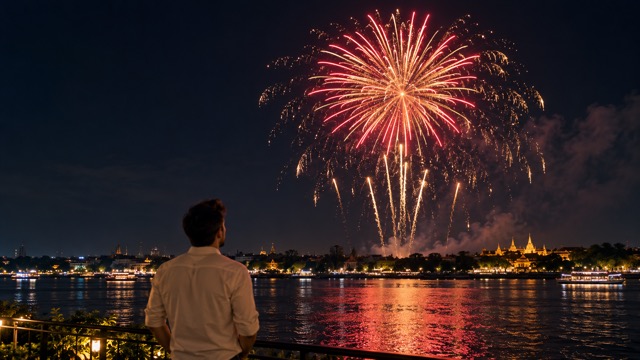
Open sky for a distinct burst
A wider view separates the foreground subject from the display. Use the sky area as a framing reference; a face you want to preserve should remain visible in your own photo.
SuperMaker ↗External reference images from SuperMaker, not FYP FX-generated results. They illustrate composition; the preset does not include a skyline selector or guarantee these burst shapes.
Frame the sky, generate and review
Before submitting, check that the source leaves room above the subject. After generation, watch the burst peak for facial changes and overlapping sparks.
Choose a photo with room for the sky
Use a clear main subject and open sky above. Keep the face away from the upper area where the bursts are intended to appear.
Check the preview and generation quote
Wait for the upload to finish, confirm the displayed 284-credit quote and select Generate once.
Review the brightest burst before downloading
Watch all five seconds. Check that the face remains readable and bursts sit behind the subject, then download the silent video to add sound.
AI Fireworks generator questions
Yes. The preset starts from your photo and asks for a steady camera, recognizable facial details and consistent clothing as trails and bursts appear behind the subject. Generated details can still change.
Choose a clear subject beneath a broad area of open sky, preferably with the face below the upper part of the frame. A tight face crop, low ceiling or busy overhead branches leaves less room for distinct bursts.
No. The entire video is silent. Add firework sounds or music you have permission to use after downloading.
A silent 5-second, 720p generation costs 284 credits. Each new generation is another paid attempt, including retries for a different result. Check the displayed quote and your balance before generating.
There is no color palette, skyline or text selector. The preset requests rising trails, colorful bursts and drifting embers. Add any countdown, date or greeting in your editor after generation.
The generated bursts can overlap the subject or lose detail. Before another paid attempt, choose a wider source with more unobstructed sky. Check the face during the brightest burst, then inspect the ending for lingering sparks and background flicker.
Check My videos and your balance before submitting again. Contact support if the status remains unclear; starting another generation can incur another 284-credit charge.
Check plans for your next celebration edit
Compare credit plans before starting additional paid generations.
What is the AI Fireworks effect?
AI Fireworks is a photo-to-video effect that adds rising firework trails, colorful bursts and drifting embers behind the main subject. The uploaded photo is the opening frame. The preset asks for a steady camera, recognizable facial details and consistent clothing while the subject holds a small smile or cheer beneath the celebration sky. The output is a silent 5-second, 720p clip that follows the source aspect ratio and costs 284 credits at the current quote. Firework placement and subject details can vary.
The sky is part of your composition
Fireworks need room above the subject to read as a celebration in the distance. Choose a portrait or wider shot with open sky, a clear face and little overhead clutter. The uploaded photo supplies the opening frame and sets the output aspect ratio.
- Choose one clear main subject with a readable face and a broad area of open sky above the head.
- Prefer an uncluttered outdoor composition. Tight face crops, low ceilings and dense overhead branches leave less room for distinct bursts.
A burst of color behind your subject
- Firework shapes, sparks, facial features, background details and lighting can distort or flicker. Review the brightest burst for effects crossing the face.
- The celebration sequence is fixed. There is no color palette, skyline, custom text or soundtrack selector. Add greetings, dates and sound in an editor after downloading.
How the celebration is intended to build
The preset asks for rising trails, a bright burst and a short hold with fading sparks, all within five seconds. It aims to keep the subject recognizable in one steady shot. The timing and placement of generated details can vary.
01Send trails into the background
During the opening two seconds, colorful trails are intended to rise behind the subject while the face remains unobstructed.
02Let the upper sky bloom
Around seconds 2–4, bright bursts and drifting embers fill the upper background as the subject holds a small smile or cheer.
03Finish with lingering sparks
The final second aims to hold a clear celebration pose while the remaining trails and embers fade in the sky.
Finish and share your clip
Use the brightest burst as the timing point for your music or greeting. Keep captions in a clear lower area so they do not hide the face or sky. Add dates and countdown text in your editor after downloading.
About the AI Fireworks effect
What does the AI Fireworks effect do?
It animates a photo into a short celebration scene with firework trails, colorful bursts and soft embers behind the main subject. It is a rendered video effect rather than a live camera filter.
Which moments suit a fireworks edit?
Birthdays, New Year greetings, graduation announcements and other milestones can suit the effect. Any greeting, year or countdown must be added separately in an editor; the preset does not generate custom text.
Can it preserve the original background?
The uploaded photo is the opening frame, and the preset asks for a steady view with fireworks behind the subject. Buildings, sky details, lighting and facial features can still change during generation.
Do I need actual fireworks in my source photo?
No. The fireworks are generated. A clear photo with open sky gives them room; you do not need to photograph a real display or stand near pyrotechnics.