AI Makeup Timelapse Generator: Natural-to-Glam Scene
Upload one clear adult portrait as an identity reference. The preset builds a new vertical vanity scene, develops one fixed glam look and closes with a small wink and smile.
Use one evenly lit, front-facing adult with the face, neck and shoulders visible. Natural-looking makeup makes the intended contrast easier to judge; the source frame and background are not retained.
284 credits per 5-second video
External portrait and glam-look references from GoEnhance, not a FYP FX before-and-after test. They do not demonstrate the timed application or wink.
Check the face, light and shoulder framing
- Use exactly one front-facing adult with a sharp face, visible neck and shoulders.
- Keep both eyes and the mouth unobscured; avoid sunglasses, strong filters and hair across the face.
- Prefer natural-looking source makeup. The upload guides identity in a new scene; it does not supply a verified bare-face opening.
Sign in and check your credit balance. View credit plans.
Review facial continuity, makeup alignment and the wink
- The reference guides identity, not the opening frame or background. A natural-looking opening is requested, but makeup removal and exact facial likeness are not guaranteed.
- Eye and lip edges, the brief brush gesture and reflected details can distort. The hairstyle and colour are intended to stay consistent; this is not a hair makeover.
- The output is silent, 5 seconds, 720p and vertical 9:16. The fixed look is soft contour, smoky eyeshadow, winged liner and red lips, with no shade menu or editable prompt.
Download first, then align sound with the actual reveal or wink. Keep captions away from the eyes and mouth, and review the opening before looping the clip.
Preset details reviewed by FYP FX ·
Compare clear portrait framing and a glam reference
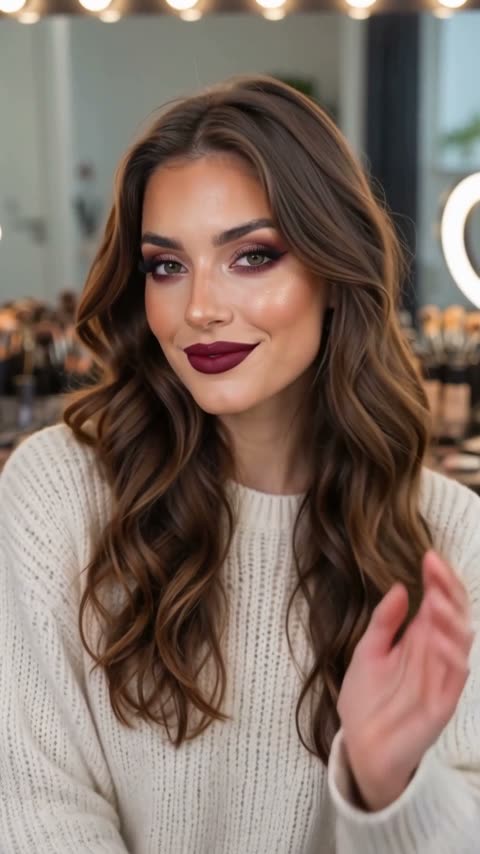
A clear face, neck and shoulders help with identity reference. The separate vanity image illustrates a finished glam look.
External vanity glam reference
The vanity reference shows smoky eye makeup and dark berry lips. FYP FX requests red lips and aims to retain the reference hairstyle; this still does not show its application sequence or wink.
GoEnhance ↗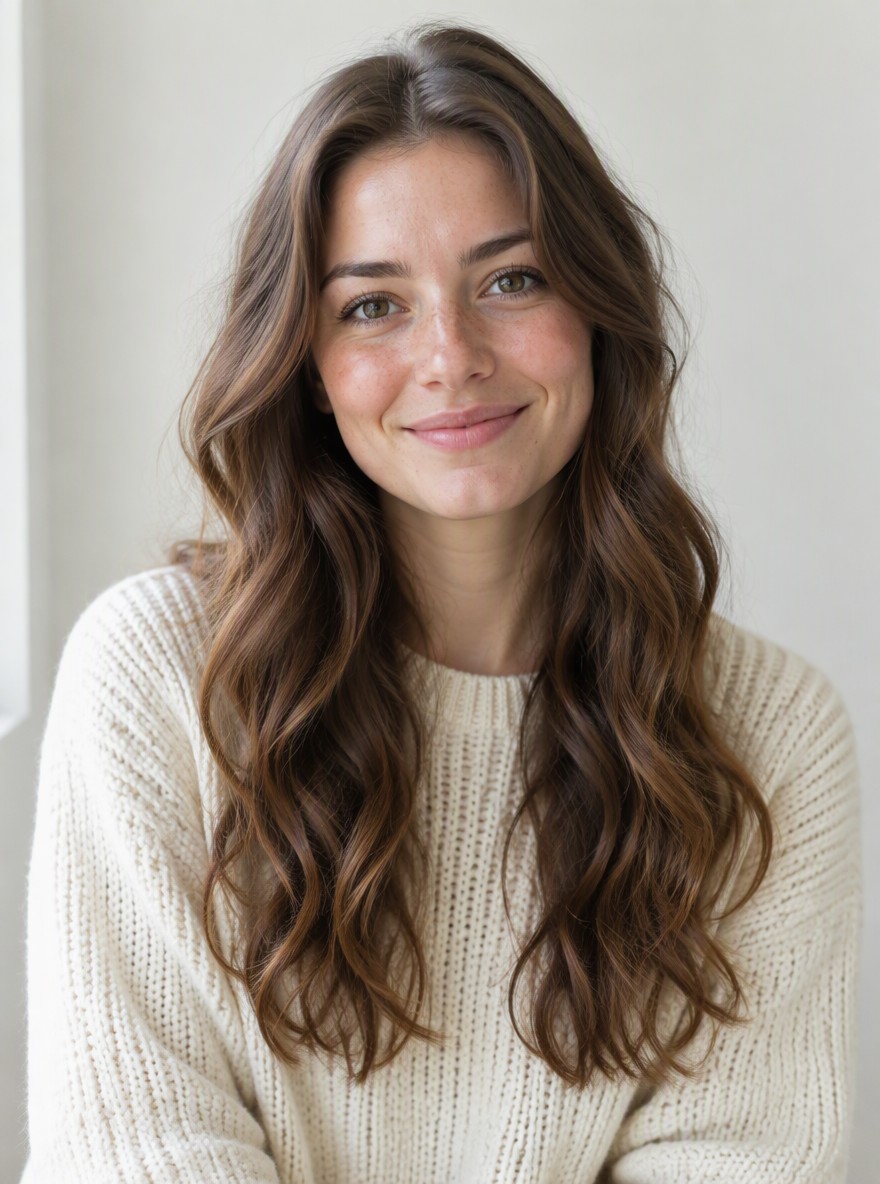
Clear adult portrait reference
This front-facing portrait shows the eyes, mouth, neck and shoulders in even light. It illustrates input framing, not a photo uploaded to or tested with FYP FX.
GoEnhance ↗External portrait and glam-look references from GoEnhance, not a FYP FX before-and-after test. They do not demonstrate the timed application or wink.
Prepare the portrait and review the glam build
Start with one clear adult portrait, then inspect facial continuity, the short brush gesture, eye and lip detail, and the final wink.
Choose one clear adult portrait
Use even light, a front-facing face, visible neck and shoulders, and no hands or hair hiding the eyes.
Check the quote and generate once
Confirm the 284-credit quote, then select Generate once. The new vanity scene, fixed glam look and wink are preset instructions.
Review the reveal and wink
Review facial likeness, makeup alignment, the short brush gesture and ending wink. Download the silent clip before adding audio.
Making a clear Makeup Timelapse clip
No. It guides identity in a new vertical vanity scene. The preset requests a natural-looking opening, but it does not promise to remove existing makeup or reproduce a verified bare-face version of the person.
One fixed glam look: soft contour, smoky eyeshadow, winged liner and red lips. The person remains seated, then gives a small wink and smile. There is no shade menu or style picker.
No. The output is silent. Download the clip, then add audio you have permission to use in your editor.
A silent 5-second, 720p vertical generation costs 284 credits. A new generation is another paid attempt, including retries for a different result. Check the displayed quote before submitting.
No. The vanity setting, fixed glam look and wink are preset instructions. It is not a hairstyle makeover, and there is no editable prompt or shade selector.
Check facial likeness, skin tone, eye and lip alignment, the brief brush movement and the final wink. The hairstyle and colour are intended to stay consistent; extra hands or reflected faces are errors to review.
Check My videos and your balance before submitting again. Contact support if the status remains unclear; starting a new generation can incur another 284-credit charge.
Plan your glam video edits
Check credit plans before creating additional makeup clips.
What is the AI Makeup Timelapse effect?
AI Makeup Timelapse uses one adult portrait as an identity reference for a new vertical vanity scene. A natural-looking opening develops into soft contour, smoky eyeshadow, winged liner and red lips, then ends with a small wink and smile. It does not reproduce the source frame or guarantee makeup removal. The output is a silent 5-second, 720p vertical 9:16 clip for 284 credits.
Provide a clear face, neck and shoulders
Use one evenly lit front-facing adult portrait with both eyes, the mouth, neck and shoulders visible. It guides identity in a newly generated vanity scene. Natural-looking source makeup makes the intended contrast easier to judge; the upload is not a promised opening frame or a verified bare-face reconstruction.
- Use one evenly lit front-facing adult portrait with both eyes and the mouth clear, plus visible neck and shoulders.
- Prefer natural-looking source makeup so the intended contrast is easier to judge. Avoid groups, strong blur, sunglasses and hair or hands across the face.
A natural-looking opening, a fixed glam build and a wink
- The reference guides identity in a new scene, not the opening frame or background. A natural-looking start is requested; makeup removal and exact likeness are not guaranteed.
- Makeup edges, the brief brush gesture and reflected details can distort. The hairstyle and colour are intended to stay consistent. There is no shade selector, hair makeover, included audio or multi-minute application tutorial.
The intended makeup-chair sequence
The intended vertical shot keeps one adult seated with a steady head-and-shoulders view. A natural-looking opening builds into soft contour, smoky eyeshadow, winged liner and red lips, then ends with a small wink and smile. The timing and makeup detail may vary.
01Establish the natural-looking opening
At about 0–1 second, the adult sits in a newly generated bulb-lit vanity scene. The face is clear and the hairstyle and colour are intended to stay consistent.
02Build the fixed glam look
At about 1–4 seconds, soft contour, smoky eyeshadow, winged liner and red lips develop. One hand briefly touches a small brush to a cheek, then lowers it below the face so the eyes and mouth stay readable.
03Hold the look with a wink
At about 4–5 seconds, the finished look holds with one small wink and a friendly smile. One eye closes and reopens; check that the eyelids and mouth return to natural shapes.
Finish and share your clip
After downloading, align sound with the actual reveal or wink. Keep captions off the eyes and mouth, and inspect the first and last frames before making a loop.
About the AI Makeup Timelapse effect
Is this a recording of makeup application?
No. It generates a short beauty scene from an identity reference. It is not a recording of a real application routine or a multi-minute makeup tutorial.
Will it remove makeup from my source photo?
No removal result is guaranteed. The preset asks for a natural-looking opening in a new scene. Use a lightly made-up reference if you want to judge the contrast more clearly.
Can I choose colours or a hairstyle?
No. The fixed look uses soft contour, smoky eyeshadow, winged liner and red lips. The hairstyle and colour are intended to remain consistent, and there is no style selector.
Can I upload a group or an obscured face?
Use exactly one adult with both eyes and the mouth clear, plus visible neck and shoulders. Avoid groups, strong blur, sunglasses and hair or hands across the face.