AI Plug Walk Video: A Short Dance Strut From One Photo
Upload one full-body standing photo. The preset asks for a loose-knee groove, compact alternating steps and low arm swings, then a planted hold in the original setting.
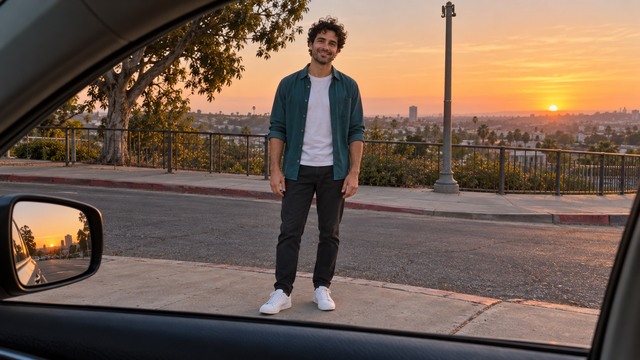
Flat ground and both shoes in frame help the walk read cleanly. Avoid seated crops.
284 credits per 5-second video
External visual reference, not a FYP FX-generated result. Review the preset description for the requested look and motion.
Check shoes, ground and arm space
- Include both shoes on flat visible ground.
- Leave space beside the body for arm swing.
- Avoid seated poses and group shots.
Sign in and check your credit balance. View credit plans.
Watch foot contact through the steps
- Knee bends, step timing, arm swing and foot contact are generated and can vary.
- This dance-only preset does not add a car-window scene or cash props, and has no route or speed control.
- The output is silent and keeps the source aspect ratio.
For a walk post, trim on the end pose and align a short beat to the plant.
Preset details reviewed by FYP FX ·
See the stylish walk framing
Compare the source scene with the simpler dance-only setup used by this preset.
Plug Walk source scene
The source trend includes a car-window scene. This five-second preset uses only a compact dance phrase and does not add the car-window exchange or cash.
SuperMaker ↗External visual reference, not a FYP FX-generated result. Review the preset description for the requested look and motion.
Prepare a clear plug-walk take
Start with a standing full-body photo, then check steps and the final pose.
Upload a standing full-body photo
Use one person on flat ground with both shoes visible.
Generate the plug walk
Confirm the 284-credit cost, then select Generate once. The gait and end pose are preset.
Review steps and pose
Check foot contact and the final hold, then download and add audio.
Making a clear Plug Walk clip
No. This is a short dance-only adaptation with loose knees and compact steps. It does not recreate a specific source video, add car-window or cash props, or include a song.
The preset asks for small alternating steps mostly in place. AI may still move or crop the person; start with both shoes and space beside the body visible.
No. Use an ordinary standing photo. The preset asks to retain the outfit, but clothing details can change during generation.
A silent 5-second, 720p generation costs 284 credits. Check the displayed cost and your balance before generating.
No. The walk is a fixed preset with no speed, direction or route control. Step timing and small movements vary between results.
Check foot contact, natural arm swing and that the end pose looks balanced.
Check generation history and balance before submitting again, and contact support if the status stays unclear.
Plan your walk edits
View credit plans before creating your walk clips.
What is the AI Plug Walk effect?
The AI Plug Walk effect animates one standing photo into a compact dance strut: relaxed knees, a foot-to-foot weight rock, two small alternating forward-and-back steps and low arm swings, ending in a planted pose. FYP FX uses a five-second dance-only adaptation in the photo's original setting. It does not include the car-window cash handoff seen in some Plug Walk filter videos.
Show the ground for the loose-knee steps
The groove shifts weight between bent knees and small forward-and-back steps. Show both shoes, a simple floor and space beside the legs; keep the arms visible for the low swing.
- Show one standing person from head to shoes on flat, visible ground with some space in front of the feet.
- Leave room beside the hips for low arm swings and start with uncrossed legs; avoid seated or mid-stride poses.
Loose knees, alternating steps and a planted hold
- The foot-to-foot weight shifts, knee position and floor contact can vary; check for sliding feet or unnatural leg bends.
- The preset contains a short dance strut in place, without a car-window scene, money exchange, full viral sequence or included song.
The plug walk happens in three beats
The preset requests a short dance-only groove in the original setting, with loose knees, compact alternating steps and low arm swings.
01Settle into a loose-knee groove
A small bent-knee weight shift starts the movement.
02Alternate compact steps
Small alternating forward-and-back steps pair with low, relaxed arm swings.
03Plant the feet and hold
The preset finishes with both feet settled on the ground.
Finish and share your clip
After downloading, align a short beat with a clear foot plant or the final pose. The silent generation does not match a song automatically.
What makes this an AI Plug Walk effect?
Is the Plug Walk song included?
No. The clip is silent. Add your chosen audio in your editor after downloading.
Why keep steps in place?
Long travel can exit the frame in five seconds.
Can I use a cropped photo?
A crop without shoes hides the gait and may make the model invent feet or ground contact. A standing full-body photo better matches this preset.