AI Popstar Video: Concert Stage Lights From One Photo
Upload one portrait or upper-body photo with a hand visible. The preset adds a solo stage, colourful lighting, a small shoulder bounce and one wave before a hold.
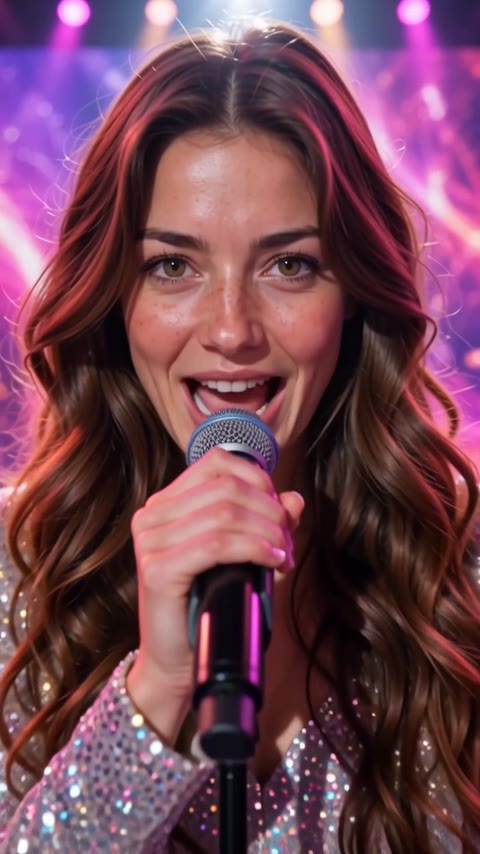
Show a clear face and at least one unobstructed hand with the upper body. The preset uses your photo as the performer reference, rather than applying a celebrity look.
284 credits per 5-second video
External visual reference, not a FYP FX-generated result. Review the preset description for the requested look and motion.
Check face, upper body and light
- Include one clear face, shoulders and at least one visible hand.
- Use even light so stage lighting has facial detail to work with.
- Prefer an empty hand and avoid another person overlapping the subject.
Sign in and check your credit balance. View credit plans.
Watch your face through the lights
- Lighting can wash out the face; hand shape, identity and stage details can vary.
- There is no microphone, crowd, singing or lip-sync setting; music is added after downloading.
- The output is silent and keeps the source aspect ratio.
For a stage post, trim on the end pose and keep stickers away from the face.
Preset details reviewed by FYP FX ·
See the pop stage framing
Choose an unobstructed face with room around the upper body for stage lighting and a wave.
Stage-light reference
A concert-lighting reference. The source image includes a microphone; the FYP FX preset requests a small wave and does not add a microphone or singing.
GoEnhance ↗External visual reference, not a FYP FX-generated result. Review the preset description for the requested look and motion.
Prepare a clear popstar take
Start with a clear portrait, then check face and lights.
Upload a clear portrait
Use one person with a sharp face and visible upper body.
Generate the popstar moment
Confirm the 284-credit cost, then select Generate once. Lights and gesture are preset.
Review face and lights
Check that your identity stays clear through the lights, then download and add audio.
Making a clear Popstar clip
The preset asks to retain the person in your photo on an imagined solo stage. It does not select a famous singer, although facial details can still drift.
The preset requests a generic stage without logos or venue names. AI can still invent marks or text, so check the backdrop before keeping the result.
No microphone, singing or lip sync is requested. The fixed gesture is a small shoulder bounce and one hand wave; the video is silent.
A silent 5-second, 720p generation costs 284 credits. Check the displayed cost and your balance before generating.
The output is silent. Add a cleared track after downloading.
Check that your face stays recognizable and lights do not fully wash it out.
Check generation history and balance before submitting again, and contact support if the status stays unclear.
Plan your stage edits
View credit plans before creating your stage clips.
What is the AI Popstar effect?
The AI Popstar effect turns one upper-body or full-body photo into a solo concert-stage moment. The backdrop changes and colorful lights appear, followed by a small shoulder bounce and one friendly wave, then a smiling hold as the light pulses softly. The preset aims to retain the person and their outfit; it does not add a microphone, audience, celebrity identity, singing or word-specific lip sync.
Keep the face clear for the spotlight
Stage lights gather around you, so an evenly lit face with visible upper body helps the performance gesture read without washing out features.
- Show one person with a clear face, shoulders and at least one hand visible; upper-body or full-body framing both fit the small gesture.
- Leave space beside the shoulder for the wave and use even face light, avoiding a tight face-only crop or hands hidden behind the body.
Lights, a small gesture and a bright hold
- Hands, facial details, stage lighting and background edges can change; check that the wave stays clear of the face.
- The result is a silent solo stage gesture, without a microphone, audience, singing performance or lyric-matched mouth motion.
The popstar moment happens in three beats
The preset builds an imagined solo stage around the uploaded person, then adds a shoulder bounce and one hand wave. It does not recreate a named singer or performance.
01Stage lights gather
Colorful generic spotbeams form a concert backdrop.
02Small performance gesture
The performer gives a small shoulder bounce and waves one visible hand, rather than singing or holding a microphone.
03Pulse and end pose
The hand lowers as the lights pulse softly and the person settles into a final hold.
Finish and share your clip
After downloading, place your chosen music under the clip and align a beat with the light pulse or wave. The silent generation has no singing or automatic lip sync.
What makes this an AI Popstar effect?
Is this a celebrity filter?
No celebrity is selected. The preset asks for the uploaded person on a generic solo stage, while generated facial details may change.
Can I choose a real stage or venue?
No. There is no venue or backdrop selector; the stage and lighting are imagined by the fixed preset.
Should I hold a microphone in the source photo?
A simple photo with one hand visible and empty better matches the wave. A held object can change or interfere with the generated hand gesture.