AI Thriller Dance Generator: Halloween Photo Video
Animate one standing person into a short Halloween dance. The key checks are claw-hand shape, grounded feet and enough room for a sideways step.
Use a full-body standing photo with free space around the arms and feet. The preset keeps the human face and outfit as references; it does not supply a famous song or full routine.
568 credits per 5-second video
External visual references, not FYP FX-generated results. The scene concept includes background dancers; this effect requests a single dancer. Your 5-second clip may differ.
Keep the full dancer and floor in frame
- Show one standing person from head to shoes, with both feet resting on the floor.
- Leave room at both sides of the body and keep the hands away from the face.
- Avoid crossed legs, a seated pose or another person overlapping the arms; the movement uses one small solo step.
Sign in and check your credit balance. View credit plans.
Check the pulse and planted feet
- The preset uses a generic zombie-style phrase, without a famous routine, celebrity likeness or costume change.
- Hands and foot contact can drift; replay the side step instead of judging only the final pose.
- The output has no song or beat synchronization. Add a track to the completed take in your edit.
If making an AI Halloween dance for TikTok, fit the music to the generated shoulder pulse and side step. Keep the shoes visible when you prepare the final crop.
Preset details reviewed by FYP FX ·
Separate the dance mood from the input framing
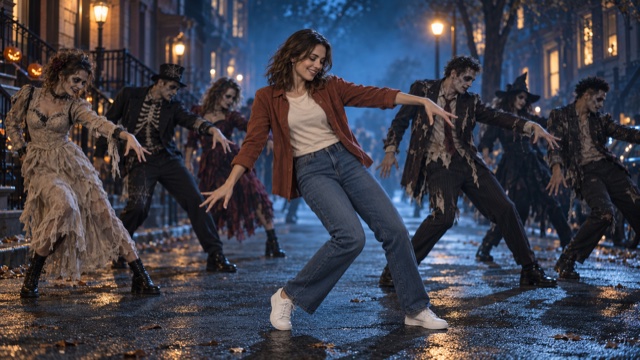
The night-street image illustrates pumpkins and fog; its background group is not part of this solo preset. The standing-photo reference shows the visible arms, floor and shoes needed to assess the short side step.
Night-street mood reference
Blue mist, pumpkin lanterns and a wet street set the Halloween mood around a dancer in a brown shirt and jeans.
SuperMaker ↗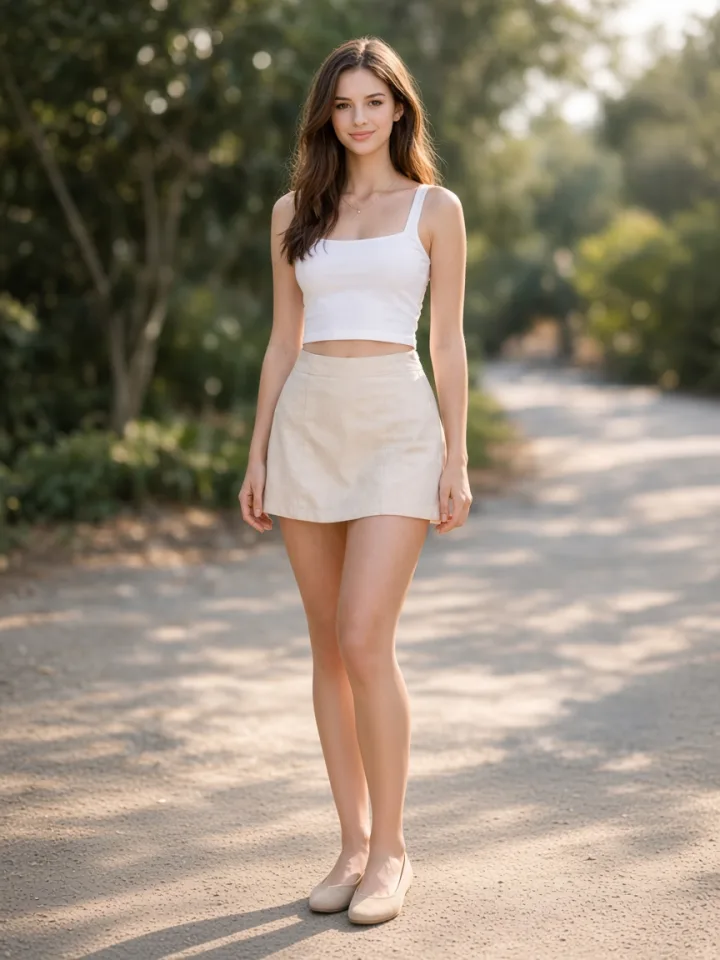
Single-person photo reference
A standing full-body photo with a clear face, both feet visible and space around the person illustrates a useful input composition. This is a photo reference, not a generated dance result.
MixVio ↗External visual references, not FYP FX-generated results. The scene concept includes background dancers; this effect requests a single dancer. Your 5-second clip may differ.
Create and inspect the solo dance
Keep the full-body preview intact, then watch the two places motion is easiest to lose: fingers and feet.
Show the shoes and side space
Upload one standing full-body photo. Check that neither shoe nor hand is cropped and that the dancer has room for a short sideways step.
Generate the short spooky phrase
Confirm the 568-credit cost and generate the fixed claw-hand, shoulder-pulse and side-step scene. Music is added later.
Replay the fingers and feet
Inspect the hand pose, face and shoe contact during the step. Download a take that stays readable through the whole movement.
Halloween dance input and movement questions
Check whether the source shows both shoes on the floor. Use a complete standing photo with open side space for a later attempt; a tight or seated crop gives the step little guidance.
This preset requests one dancer. Choose a single-person image so overlapping arms and faces do not compete with the solo movement.
Start with the hands away from the face and room around the torso. Review the claw pose in the completed clip; the generated hand position can still vary.
The scene and short dance phrase are fixed. The video is silent and has no music selector; add audio after downloading and fit the edit to the actual movement.
One take costs 568 credits. Check the displayed cost before starting another take with a different photo.
It is an external mood reference. The live preset requests one person, with no added crowd or backup dancers.
A silent 5-second, 720p clip in your photo’s aspect ratio. Five seconds is the video duration; check generation history before retrying if processing status is uncertain.
Start with both shoes in view
Choose a full-body photo that leaves the claw hands and sideways step room to move.