Burger Thru Window Video: Awkward Window Stare From One Photo
Create a comic cafe-window scene from one photo: a burger bite, an awkward stare at the camera and a small reach toward the curtain. The photo guides identity in a newly generated vertical scene.
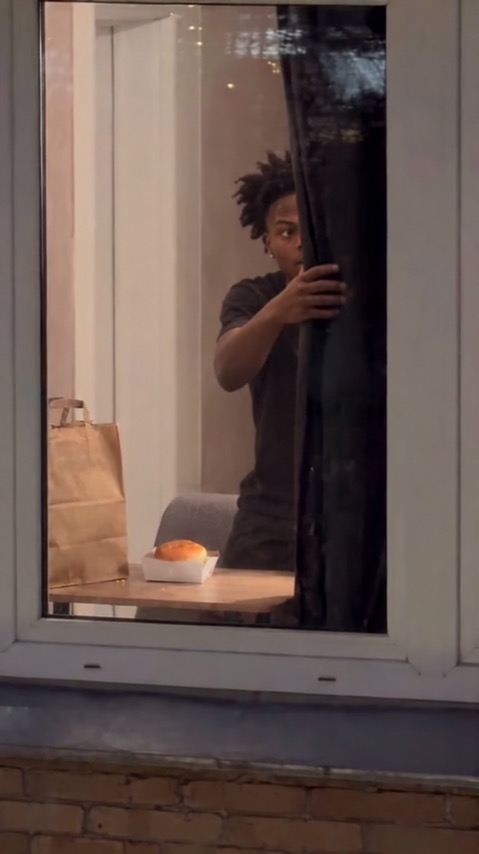
A visible mouth, eyes and hands help this sequence. You do not need a burger, window or curtain in the reference photo.
284 credits per 5-second video
External visual reference, not a FYP FX-generated result. Review the preset description for its requested look and motion.
Show the face and hands for the bite-and-stare joke
- Choose one clear face in even light, with eyes unobstructed.
- Include shoulders, torso and hands rather than a tight face-only crop.
- Avoid a held object or another person overlapping the subject.
Sign in and check your credit balance. View credit plans.
One bite, a stare and a reach toward the curtain
- The photo is an identity reference; the window, burger, hands and scene layout are newly generated.
- Bite contact, facial resemblance, reflections and curtain movement can distort or overlap.
- The output is a silent 5-second, 720p vertical 9:16 video.
After downloading, place a short sound at the moment the eyes find the camera. The clip is silent; you can trim after the stare if the curtain reach is less useful.
Preset details reviewed by FYP FX ·
See the window burger framing
Keep the face, burger, free hand and curtain edge readable through the glass.
Window-scene reference
The window, burger and reachable curtain show the scene layout. FYP FX uses its own short bite, awkward stare and reach toward the curtain edge.
SuperMaker ↗External visual reference, not a FYP FX-generated result. Review the preset description for its requested look and motion.
Prepare your Burger Thru Window photo
Use one clear person with some upper body and both hands visible. The photo guides identity and outfit; the cafe window, burger and curtain are generated in a new vertical scene.
Upload a clear person photo
Choose one clear face in even light, with eyes unobstructed.
Check the quote and generate once
Confirm the 284-credit quote and upload preview, then select Generate once. The sequence is preset.
Review the full sequence and download
Check the hand-to-burger contact, mouth, eye contact through the glass and curtain reach.
Making a clear Burger Thru Window clip
No. This tool generates a new short scene from your photo. It does not load or reproduce another app’s editable template.
No. Those are part of the generated cafe scene. A simple reference with the face, torso and hands visible better matches the sequence.
The preset asks for a small reach toward the curtain after the stare, rather than a full closure. Its placement and movement can vary.
A silent 5-second, 720p generation costs 284 credits. Check the displayed quote and your balance before generating.
No. Download the silent clip, then add sound or music in your editor.
Check the hand-to-burger contact, mouth, eye contact through the glass and curtain reach.
Check My videos and your balance before submitting again. Contact support if the status remains unclear.
Plan your window-burger edits
View credit plans before creating your comedy clips.
What is the Burger Thru Window effect?
The Burger Thru Window effect uses one adult portrait as an identity reference for a newly composed vertical 9:16 cafe-window scene. Viewed from outside at a slight angle, the person takes one bite, lowers the burger, notices the camera and holds awkward eye contact before reaching toward the curtain edge. The clip keeps the snack-and-stare premise in five seconds, with a small camera push-in that stays outside the glass.
Show the face and hands for the bite-and-stare joke
Use one clear person with some upper body and both hands visible. The photo guides identity and outfit; the cafe window, burger and curtain are generated in a new vertical scene.
- Choose one adult with a sharp, evenly lit face, clear hairstyle and outfit details.
- A head-and-shoulders or waist-up reference is enough; the generator supplies the window, burger and hands, so the source does not need to show a cafe.
One bite, a stare and a reach toward the curtain
- Facial detail, glass reflections, burger grip and bite motion can vary. Check that reflections do not duplicate the face.
- The five-second adaptation ends with a reach toward the curtain rather than a guaranteed full curtain closure. It generates a new 9:16 setting rather than preserving the source photo crop.
The intended Burger Thru Window sequence
The preset asks for these three stages. Their timing, appearance and motion may differ in the generated result.
01Take a casual bite
The preset starts the person inside the cafe window with a plain burger and asks for one small bite.
02Notice the camera
The person looks toward the camera outside the glass and pauses in an awkward stare.
03Reach toward the curtain
One hand moves toward the curtain or its edge. A complete curtain closure is not required.
Finish and share your clip
After downloading, place a short sound at the moment the eyes find the camera. The clip is silent; you can trim after the stare if the curtain reach is less useful.
About the Burger Thru Window effect
Is this an editable template from another app?
No. This tool generates a new short scene from your photo. It does not load or reproduce another app’s editable template.
Do I need a burger or a window in the photo?
No. Those are part of the generated cafe scene. A simple reference with the face, torso and hands visible better matches the sequence.
Does the curtain close completely?
The preset asks for a small reach toward the curtain after the stare, rather than a full closure. Its placement and movement can vary.