Show the face and hands for the bite-and-stare joke
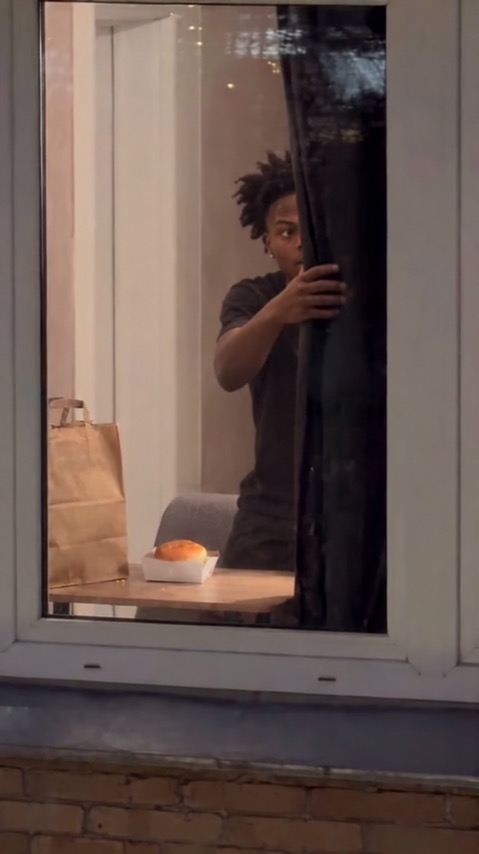
Create a comic cafe-window scene from one photo: a burger bite, an awkward stare at the camera and a small reach toward the curtain. Use the Burger Thru Window tool to create the clip, or read the effect introduction for the intended sequence.
The preset creates a silent, 5-second, 720p video for 284 credits. The scene uses a vertical 9:16 frame, regardless of the source photo’s orientation. Check the displayed quote before generating; five seconds is the finished clip length, rather than the processing time.
Step 1: Choose the reference for this sequence
Your photo is an identity reference for a newly generated scene. It does not set the opening video frame, source background or final crop.
Use one clear person with some upper body and both hands visible. The photo guides identity and outfit; the cafe window, burger and curtain are generated in a new vertical scene.
- Choose one clear face in even light, with eyes unobstructed.
- Include shoulders, torso and hands rather than a tight face-only crop.
- Avoid a held object or another person overlapping the subject.
A straight-on or slight three-quarter face is useful here because the eyes and mouth carry the joke. A close face crop leaves little reference for the burger-holding hands. Do not expect a photographed window or food prop to carry over into the generated composition. Use a photo you have permission to use.
Step 2: Upload and start one generation
Open Burger Thru Window, sign in and upload one JPG or PNG up to 20 MB. Wait for the upload to finish and check the preview against the photo guidance above. Confirm your balance covers 284 credits, then select Generate once.
There is no burger, curtain, scene or timing selector. Processing can take several minutes. If progress stops updating, check My videos and your balance before submitting again. Contact support if the status remains unclear.
Step 3: Review the full action and ending
The preset starts the person inside the cafe window with a plain burger and asks for one small bite. The person looks toward the camera outside the glass and pauses in an awkward stare. One hand moves toward the curtain or its edge. A complete curtain closure is not required. These are the intended actions; generated timing, identity and object motion can differ.
Watch the full clip once at normal speed, then replay the contact points and ending:
| Check | What to review |
|---|---|
| Bite contact | The burger, mouth and holding fingers meet without merging or hiding the face. |
| Camera notice | The eyes visibly find the camera after the bite, rather than staring away for the whole clip. |
| Glass and reflections | The person remains readable through the pane without duplicated eyes or faces. |
| Curtain reach | A single hand reaches toward an edge without an extra arm; a full curtain closure is not the intended requirement. |
If the bite obscures the face, use a reference with a clear mouth and more upper-body detail. If the hands distort, avoid a source already holding a large object. Each new generation uses credits, and a different source does not guarantee a corrected result.
Step 4: Download and finish the timing
Use Download video in the studio, or open the completed result in My videos. After downloading, place a short sound at the moment the eyes find the camera. The clip is silent; you can trim after the stare if the curtain reach is less useful.
Music, captions and trims are editing steps after downloading. If you share the result, identify it as AI-generated so viewers understand that the scene or movement is newly created.
FAQ
Is this an editable template from another app?
No. This tool generates a new short scene from your photo. It does not load or reproduce another app’s editable template.
Do I need a burger or a window in the photo?
No. Those are part of the generated cafe scene. A simple reference with the face, torso and hands visible better matches the sequence.
Does the curtain close completely?
The preset asks for a small reach toward the curtain after the stare, rather than a full closure. Its placement and movement can vary.
Choose a suitable photo and create a Burger Thru Window video. The effect introduction has a quick summary of the photo requirements and limitations.