Day of the Dead Pet Video Generator: Soft Memorial Clip From One Photo
Upload one clear photo of one pet. The preset adds marigold-orange light, a few petals behind the animal and one small head turn before a calm hold.
A calm, well-lit face reads best. Avoid heavy filters on the source photo so the eyes stay clear.
284 credits per 5-second video
External visual reference, not a FYP FX-generated result. Review the preset description for the requested look and motion.
Check the face, eyes and headroom
- Show one pet with its face and distinctive markings clearly visible.
- Use even light and a little space around the head for the petals.
- Avoid another pet or person overlapping the animal, heavy filters and motion blur.
Sign in and check your credit balance. View credit plans.
Watch the eyes through the glow
- The generated clip can change the animal’s species cues, markings, eyes or body shape.
- Petal paths, light intensity and the small movement can vary; this is not a recovered memory.
- The output is silent and keeps the source aspect ratio.
If you share the remembrance clip, keep captions clear of the face and markings. Music and text can be added in your editor after downloading.
Preset details reviewed by FYP FX ·
See the soft ofrenda framing
A calm pet portrait helps keep the face readable under warm light.
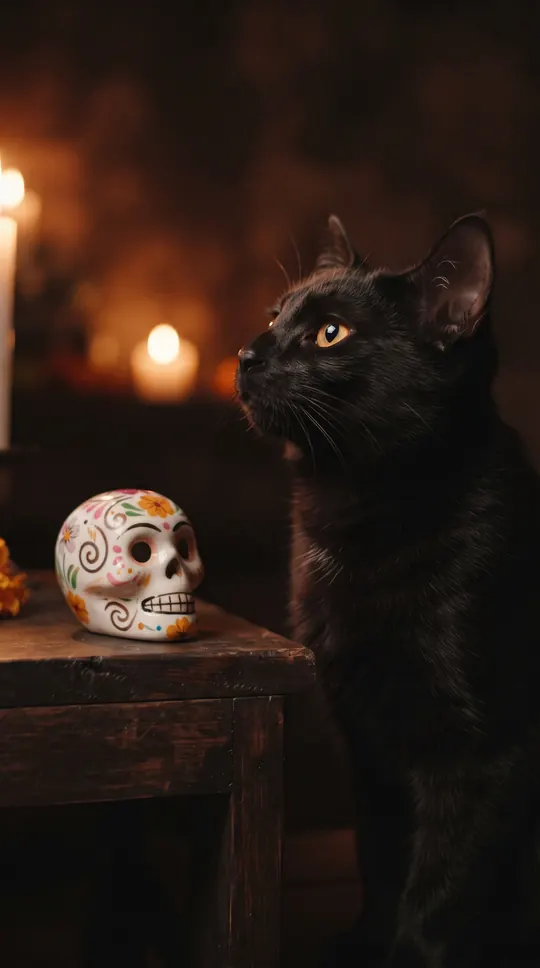
Warm pet memorial scene
Warm candlelight around a clearly visible cat offers a memorial mood reference. Source props are illustrative; this preset asks for marigold light and petals while keeping the original setting.
Wakepix ↗External visual reference, not a FYP FX-generated result. Review the preset description for the requested look and motion.
Prepare a clear memorial take
Start with a calm pet portrait, then check the eyes and petals.
Upload a clear pet photo
Use one sharp photo of one pet with the face visible and evenly lit.
Generate the memorial moment
Confirm the 284-credit cost, then select Generate once. Light, petals and one small head turn are preset.
Review the eyes and glow
Check that the face stays recognizable and petals do not cover the eyes, then download and add a soft track if you want.
Making a clear Day of the Dead Pet clip
The preset requests warm light and petals, without skull makeup. Generated details can still vary; check the face and markings before keeping a result.
It is designed as an imagined remembrance edit inspired by marigold-orange light. It does not reproduce a real moment or your pet’s actual movements.
Choose a crop showing one pet with no person or other animal overlapping it. This gives the model a clearer subject than a group image.
A silent 5-second, 720p generation costs 284 credits. Check the displayed cost and your balance before generating.
The output is silent. Add a soft track in your editor after download if you want audio.
There is no species selector. The uploaded photo supplies the animal’s appearance; AI may still change its anatomy or markings, so inspect the full clip carefully.
Check generation history and balance before submitting again, and contact support if the status stays unclear.
Plan your memorial edits
View credit plans before creating your memorial clips.
What is the Day of the Dead Pet effect?
The Day of the Dead Pet effect animates one pet photo into an imagined remembrance moment. Warm marigold-orange light gathers, a few petals drift behind the pet and it makes one small natural head turn before settling. The preset aims to retain the same animal, species, markings and setting; it does not turn the pet into a ghost or recreate a real memory.
Give the glow room around a calm face
The marigold light and petals gather around the pet, so a clear face with a little open space around the head works best. A quiet, well-lit portrait keeps the memorial tone readable.
- Use one pet with a sharp, evenly lit face and distinct natural markings; avoid people or other animals in the frame.
- Leave space around the head and keep both eyes visible so the small turn and drifting petals can be reviewed.
Warm light, petals and a small natural movement
- Eyes, fur, feathers or scales can change during animation; anatomy and motion may be less consistent for unusual pet species.
- This is a silent imagined tribute with soft light and petals, without skull makeup, graves or a separate spirit animal.
The memorial moment happens in three beats
The preset asks for a quiet, newly imagined remembrance scene. Your photo guides the animal’s appearance; its markings, expression and movement may change.
01Marigold light gathers
Warm orange light softens around the pet like a quiet ofrenda glow.
02Petals drift slowly
A few orange and yellow petals are intended to drift around the pet. Check that they do not obscure its face.
03A small head turn and hold
The pet makes one small head turn, then holds calmly. The preset requests the original animal, species and markings, but AI may still change details.
Finish and share your clip
After downloading, you can add a gentle instrumental and a short message in your editor. Keep the face and distinctive markings visible and identify the scene as AI-generated if you share it.
What does the Day of the Dead Pet effect create?
Does it recreate a real memory?
No. The light, petals and movement are newly generated from a still photo. It cannot recover how your pet actually moved.
Will my pet look like a sugar skull?
The preset asks for light and petals without skull makeup. Review the animal’s face and markings because AI can introduce unintended details.
Why keep humans out of the frame?
The effect is tuned for one pet face. Extra people can distract the model from the memorial subject.