Flying Car Generator: Blue-Thruster Street Takeoff
Upload one clear whole-vehicle reference. The preset recreates its appearance in a new vertical street scene, adds blue thrusters, then requests a short lift, a gentle turn and a hover.
Use one clear exterior reference with the whole vehicle, wheels and paint colour visible. The source background and opening frame are not retained.
284 credits per 5-second video
External photo and flight-concept references from GoEnhance, not a FYP FX before-and-after test or a generated video result.
Check the body, wheels and paint color
- Use exactly one car, truck, van or similar vehicle with the complete exterior visible.
- Keep the body shape, paint colour and wheels readable; avoid heavy glare and overlapping vehicles.
- A driveway or product photo is suitable. The generated street and camera view are new; a person photo is not the subject.
Sign in and check your credit balance. View credit plans.
Review the thrusters, lift and hover
- The reference guides vehicle appearance, not the opening frame. Its background, exact viewpoint and aspect ratio are not retained.
- Body details, wheel attachment, jets, smoke and distant people can distort. Automatic removal of plates or lettering is not guaranteed; review the result before sharing.
- The output is silent, 5 seconds, 720p and vertical 9:16. There is no city selector, flight-path control or included jet sound.
Download first, then align sound with the actual lift. Keep stickers clear of the body and wheels, and edit any unwanted plate or lettering detail before sharing.
Preset details reviewed by FYP FX ·
Compare vehicle framing and the flight concept
Use a complete exterior reference for appearance, then review the vehicle and jets in the newly generated street scene.
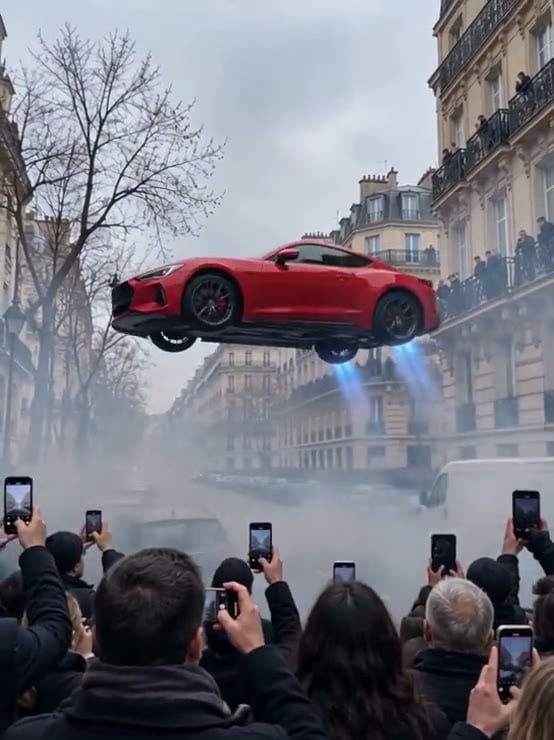
External blue-thruster flight reference
A red coupe hovers over a street with blue jets and smoke as a foreground crowd films. This source image illustrates the flight concept; FYP FX requests a low hover and distant onlookers.
GoEnhance ↗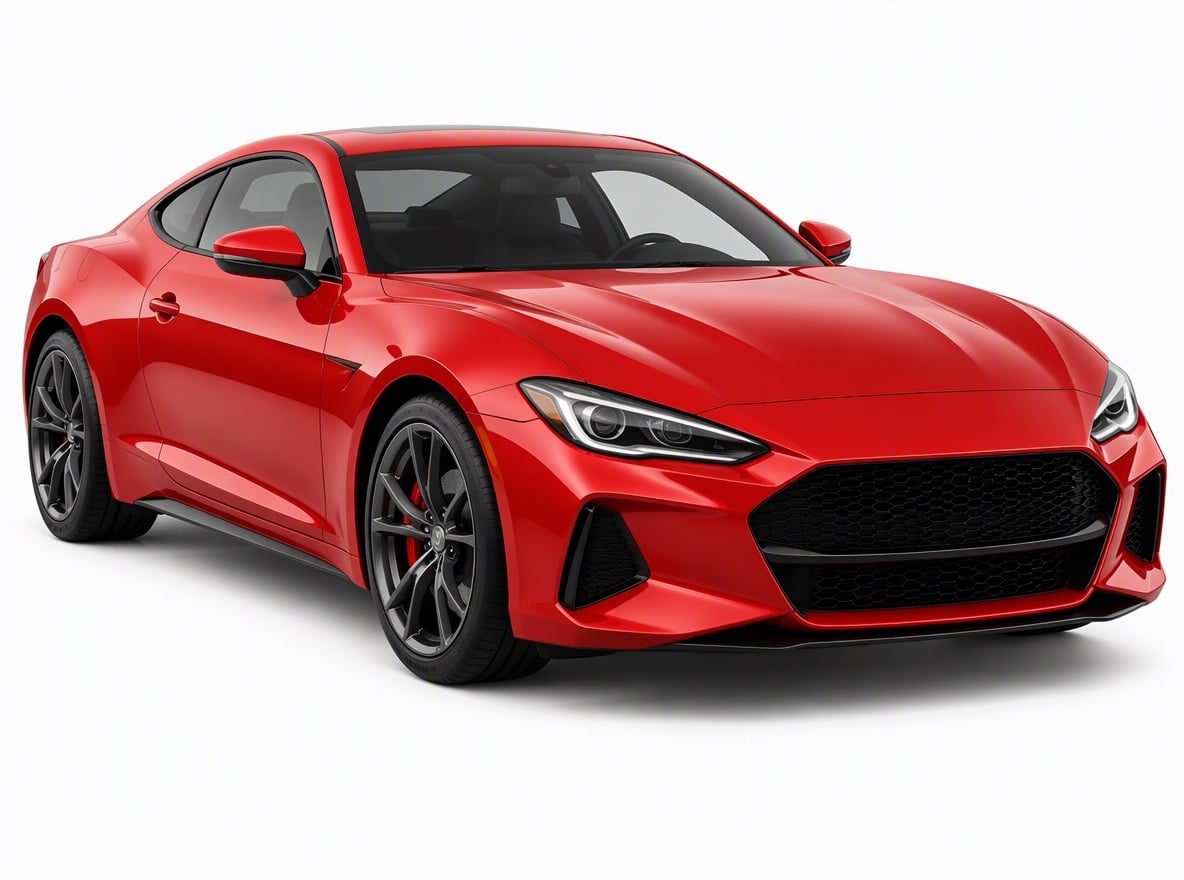
Whole-vehicle photo reference
A red coupe is shown from a front three-quarter angle on a plain background, with its body and visible wheels uncropped. Use this framing idea for an appearance reference; it was not tested with FYP FX.
GoEnhance ↗External photo and flight-concept references from GoEnhance, not a FYP FX before-and-after test or a generated video result.
Prepare the vehicle photo and review the takeoff
Start with one clear whole-vehicle reference, then check ignition, wheel continuity, the short lift and the final hover.
Choose one clear vehicle photo
Choose one full exterior reference with readable body shape, paint colour and wheels; the background will be newly generated.
Check the quote and generate once
Confirm the 284-credit quote, then select Generate once. The street scene and short takeoff sequence are fixed.
Review the lift and hover
Check the thruster ignition, wheel attachment, lift and final hover. Download the silent clip before adding sound.
Making a clear Flying Car clip
Use one clear exterior photo of a car, truck, van or similar vehicle, with the full body and wheels visible. The photo guides its appearance in a newly generated street scene; it is not the opening frame.
No. The preset builds a new generic city street in vertical 9:16. A driveway or product photo can guide the vehicle, but its background, exact viewpoint and crop are not retained.
No. The output is silent. Add cleared audio after downloading if you want sound.
A silent 5-second, 720p vertical generation costs 284 credits. Each new generation, including a retry for another result, is another paid attempt at the displayed quote.
No. Blue thrusters, a short lift, one gentle turn and a final hover are fixed instructions. There is no city or flight-path selector.
Check the body shape and paint colour, wheel count and attachment, readable blue jets, ground clearance and a stable final hover. Review any plates or lettering and blur or crop them in your editor when needed; automatic removal is not guaranteed.
Check My videos and your balance before submitting again. Contact support if the status remains unclear. Starting another generation can incur another 284-credit charge.
Plan your Flying Car edits
Check credit plans before creating additional takeoff clips.
What is the Flying Car effect?
Flying Car uses one exterior vehicle photo as an appearance reference for a new vertical street scene. Blue thrusters ignite beneath the grounded vehicle, then it lifts a short distance, makes a gentle turn and holds a hover while distant onlookers raise phones. The source background and opening frame are not retained. The output is a silent 5-second, 720p vertical 9:16 clip for 284 credits.
Show the whole vehicle clearly
A sharp exterior reference helps the model recreate the vehicle’s body shape, paint colour and wheels in a new vertical street scene. A driveway, street or product photo can work; the source background and first frame are not preserved.
- Use one clear exterior reference of a car, truck, van or similar vehicle, with the entire body and wheels visible.
- A driveway, street or product photo can guide its appearance. Avoid tight interior crops, overlapping vehicles and heavy glare that hides the paint colour.
Blue thrusters, a short lift and a hover hold
- The reference guides appearance in a new scene; the source frame, viewpoint, background and aspect ratio are not retained. Body details, wheel attachment, jets, smoke and distant people can distort.
- The fixed sequence is blue thruster ignition, a short lift with a gentle turn and a hover. There is no city or path selector or included jet sound. Review plates and lettering before sharing; automatic removal is not guaranteed.
The intended street takeoff sequence
The intended sequence starts with one grounded vehicle in a newly generated city street. Blue jets lead into a short lift and turn, followed by a hover while distant sidewalk onlookers raise phones. Exact motion and timing can vary.
01Ignite the blue thrusters
At about 0–2 seconds, blue jets light beneath the chassis while the vehicle remains grounded and upright. Low smoke should leave the body and wheels readable.
02Lift and turn slightly
At about 2–4 seconds, the vehicle rises a short distance and makes one gentle mid-air turn. The whole body stays in frame and the wheels remain attached.
03Hold a clear hover
At about 4–5 seconds, the vehicle holds above the road as distant onlookers raise phones. They stay secondary to the vehicle.
Finish and share your clip
Download the silent clip and align a chosen sound with the actual ignition or lift. Keep captions away from the chassis and wheels, and review plates or lettering before sharing.
About the Flying Car effect
Does the photo become the first frame?
No. It guides the vehicle’s appearance in a new vertical 9:16 street scene. The source camera angle, background and framing are not retained.
Can I choose a city or a long flight?
No. The fixed sequence is blue thruster ignition, a short lift with a gentle turn and a hover. There is no city or route selector.
Does it include jet audio?
No. The output is silent. Download it and add audio in your editor.
How is this different from Tesla Roadster?
Tesla Roadster is an in-cabin driver scene. Flying Car uses an exterior vehicle reference and keeps the entire vehicle as the subject of a street takeoff.