Halloween Costume Walk Generator: Low-Angle Cape Reveal
Upload one full-body reference of an adult, cat or dog. The preset builds a new vertical scene with one burgundy cape already in place, two short steps and an upward camera reveal.
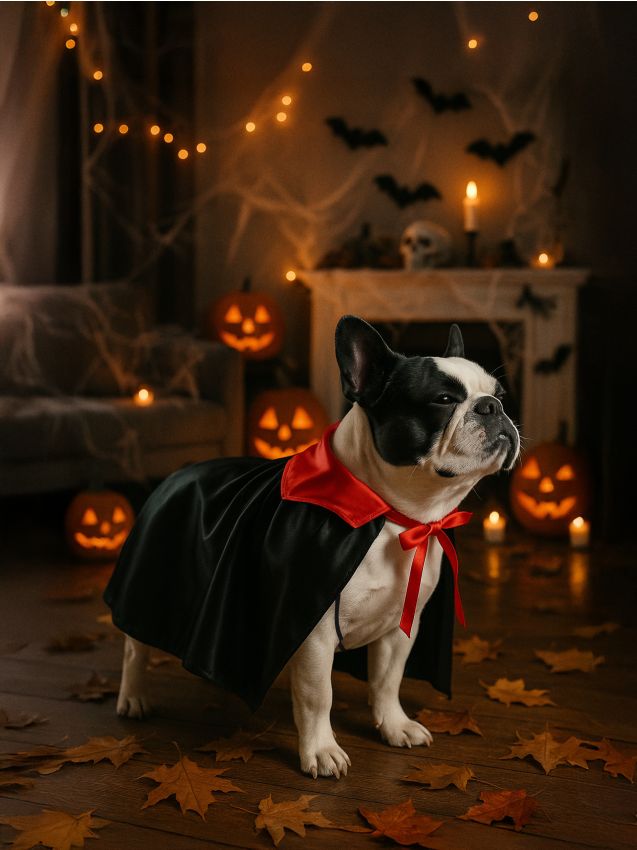
Use a clear full-body standing reference. For a cat or dog, show the face and four-legged stance. A costume or low-angle source photo is not needed.
284 credits per 5-second video
External costume and framing reference, not a FYP FX-generated video result. The preset generates its own outfit and camera movement.
Check the face, full body and stance
- Use exactly one adult, one cat or one dog with a clear face.
- Show the full body and shoes or paws; for a pet, keep the four-legged stance readable.
- Prefer a relaxed standing pose with no other subject or large object overlapping the body.
Sign in and check your credit balance. View credit plans.
Review the low approach and upward reveal
- The photo guides identity in a new vertical scene; the source frame, background and outfit are not retained.
- Gait, facial detail, pet markings, cape edges and camera movement can distort or vary.
- The fixed look is a burgundy cape without a costume selector, morph or outfit cycling. The output is silent, 5 seconds, 720p and 9:16.
Download first, then align sound with the camera rise in your editor. For an extended opening, use a frame from the generated low-angle scene rather than assuming the source photo will match it.
Preset details reviewed by FYP FX ·
See the low-camera walk framing
Use an identity photo with a clear face or muzzle, visible body and readable shoes or paws.
Natural pet-costume reference
A pet-clothing photo shows a clear muzzle and a natural standing pose in a black-and-red cape. FYP FX generates its own burgundy-cape walk and camera reveal in a new scene.
Sinsay ↗External costume and framing reference, not a FYP FX-generated video result. The preset generates its own outfit and camera movement.
Prepare the reference and review the reveal
Start with one clear full-body subject, then check both steps and the final full-costume view.
Choose one clear full-body reference
Use one standing adult, cat or dog with a sharp face and visible shoes or paws.
Check the quote and generate once
Confirm the 284-credit quote, then select Generate once. The cape, two steps and upward camera reveal are fixed.
Review the walk and full reveal
Watch foot contact, the camera rise and the ending face, then download and add audio in your editor.
Making a clear Halloween Costume Walk clip
Costume Walk starts with one cape outfit already on the subject and reveals it through movement and camera angle. Costume Transformation changes the outfit in place. This preset does not morph or cycle through costumes.
No. This preset requests one burgundy vampire-cape look, without a costume menu, colour control or hat. Generated fabric and colour may still vary.
Use exactly one adult person, one cat or one dog. The preset keeps people walking on two legs and cats or dogs on four; other species and group scenes are outside its intended subject set.
A silent 5-second, 720p vertical 9:16 generation costs 284 credits. Check the displayed quote and your balance before generating.
No. The photo guides the subject’s identity and proportions. The cape, setting, low camera viewpoint and movement are generated in a new vertical scene.
Check the two steps, shoe or paw contact, the upward camera move, facial resemblance and one consistent cape. For pets, inspect four-legged anatomy and an animal mouth rather than a human expression.
Check My videos and your balance before submitting again. Contact support if the status remains unclear.
Plan your Halloween video edits
Check credit plans before creating additional costume-walk clips.
What is the Halloween Costume Walk effect?
Halloween Costume Walk generates a new vertical scene from one adult, cat or dog identity reference. The subject already wears one burgundy vampire cape, takes two short steps toward a low camera, then stops as the camera rises and tilts up to show the body, cape and face. It reveals one outfit rather than morphing or cycling costumes.
Use a full-body identity reference, not a shoe-level crop
The tool builds a new vertical scene from the reference subject. A clear standing adult, cat or dog gives it face and body detail for the walk. The uploaded background, camera angle and outfit are not the finished scene.
- Use one clear full-body standing reference of an adult, cat or dog. Include the face and shoes or paws; for pets, show a readable four-legged stance.
- No costume, low-angle photo or hallway background is needed. The upload guides identity; the cape, setting and camera viewpoint are newly generated.
Two steps, a camera rise and one cape reveal
- Gait, facial detail, pet markings, cape edges and camera motion can change or distort. Review both steps and the ending view; for pets, check natural four-legged anatomy and an animal mouth.
- The fixed look is one burgundy cape, without a costume, hat or colour selector. The source frame and aspect ratio are not retained; output is a silent 5-second, 720p vertical 9:16 video for 284 credits.
The intended walk-and-reveal sequence
The subject wears the same burgundy cape from the first generated frame. The reveal comes from the low camera moving upward, rather than a costume change.
01Take two short steps from a low view
The camera starts near shoes or paws and eases back as the subject approaches, keeping a little distance.
02Stop as the camera rises
The subject slows to a stop while the camera rises and tilts upward to show the whole body, cape and face.
03Hold the final look
The adult gives a small smile. A cat or dog keeps a natural four-legged pose with a slight head tilt or alert ears, without a human smile or paw wave.
Finish and share your clip
After downloading, place a short sound or beat at the upward reveal. Keep the full body in the vertical frame; a tight crop can hide the cape and shoe or paw contact.
About the Halloween Costume Walk effect
Does the outfit transform during the clip?
No transformation is requested. One burgundy cape outfit is already present, and the camera reveals it as the subject walks and stops.
Is this an exact recreation of a reference video?
No. It is a fixed low-angle approach and upward-reveal preset. Identity, gait, fabric and camera timing are generated and can differ between results.
Will cats and dogs walk upright?
The preset requests natural four-legged movement and a short back cape. Review the result for extra limbs, upright poses, humanized mouths or changed markings.
Does it include music?
The output is silent. Add your chosen music or sound after downloading; there is no song or automatic beat-sync control.