Choose a full-body reference for the low-angle entrance
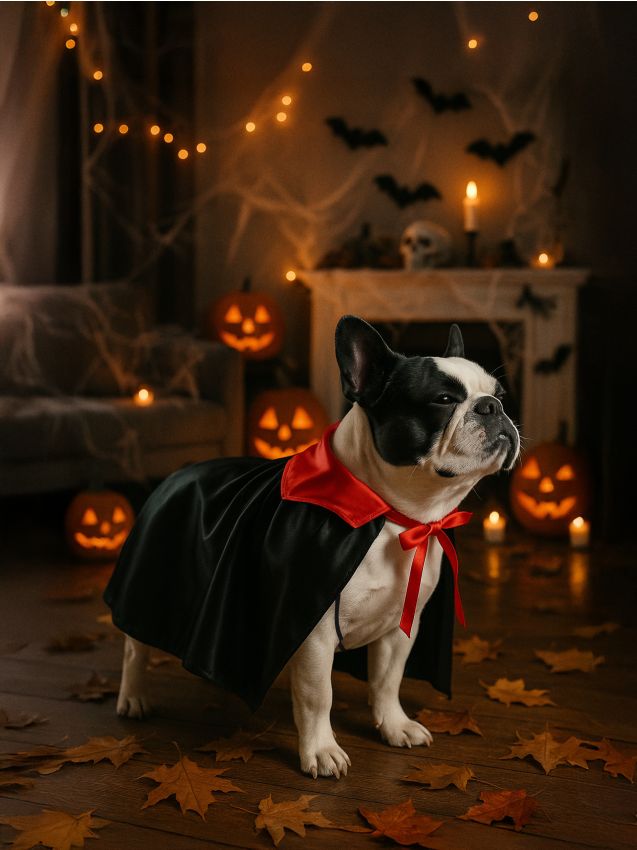
The Halloween Costume Walk generator creates a new scene in which one adult, cat or dog already wears a burgundy vampire cape. The subject takes two short steps toward a low camera, slows to a stop, then the camera rises and tilts upward to reveal the body, costume and face. The outfit stays the same throughout; it does not morph on during the walk.
The preset creates a silent, 5-second, 720p vertical 9:16 video for 284 credits. Check the displayed quote before generating. Five seconds describes the result, rather than the processing time.
Step 1: Select one adult, cat or dog photo
Use one JPG or PNG up to 20 MB. The upload is an identity reference, rather than a promised opening frame. The scene, low viewpoint and cape are newly generated, so you do not need a costume photo, a hallway or a shoe-level camera angle.
- For an adult, show a clear face, a relaxed standing body and both shoes.
- For a cat or dog, show the face and full body with a readable four-legged stance. A front or slight three-quarter view can retain facial detail while showing the legs.
- Keep other people, animals and large objects from overlapping the subject.
- Avoid a distant face, heavy blur or a tight crop that removes the feet or paws.
A three-quarter body crop can omit proportions needed for the generated steps. Use a full-body source when available, and choose a photo you have permission to use.
Step 2: Check the fixed look and generate once
Open Halloween Costume Walk, sign in and upload the photo. Wait for the upload to finish and check the face and full stance in the preview. Confirm your balance covers 284 credits, then select Generate once.
There is no editable prompt, costume menu, colour picker, hat option or camera control. The adult look is dark clothing beneath a burgundy velvet cape with a plain standing collar. Cats and dogs receive a shorter burgundy back cape and low collar, with the face and ears uncovered and the cape kept clear of the ground. AI may still change colour, fabric and anatomy.
Processing can take several minutes. If progress stops updating, check My videos and your balance before submitting again. Contact support if the status remains unclear.
Step 3: Review the two steps and camera rise
The preset asks the camera to start near the shoes or paws and ease backward as the subject takes two short steps. The subject then slows to a stop while the camera rises and tilts upward, leaving the full body, cape and face readable at the end. The adult gives a small smile; a cat or dog keeps a natural pose with a slight head tilt or alert ears.
Watch the full clip, then replay the ground contact and ending:
| Check | What to review |
|---|---|
| Approach | Two short steps have readable shoe or paw contact, without sliding, extra legs or a sudden body-size jump. |
| Camera path | The viewpoint rises smoothly from low level, without an unexplained cut or losing the face at the end. |
| One costume | The burgundy cape stays one coherent outfit rather than changing shape, cycling looks or becoming a new character. |
| Ending frame | The body, face and costume fit together in the frame instead of ending on a tight crop. |
| Pet identity | A cat or dog retains recognizable species cues and markings, four-legged anatomy and an animal mouth rather than a human smile or paw wave. |
If the legs distort, try a sharper full-body reference with a simpler stance. If the face changes, use a clearer face without another object crossing it. Camera timing and generated details can still vary, and each new generation uses credits.
How this differs from a costume morph
AI Halloween Costume Transformation changes an outfit in place. Costume Walk uses the same cape from the beginning and reveals it through the subject's approach and the upward camera move. AI Enchantress is another transformation option, with sparkles and a dark-cloak change rather than a low-angle walk.
Use Costume Walk when the entrance and camera reveal are the main idea. There is no multi-costume slideshow or separate pet-and-owner mode; make separate clips if you want a series, with a separate credit cost for each generation.
Step 4: Download and add sound in your editor
Use Download video in the studio, or open the completed result in My videos. The clip is silent, without an included song or automatic beat matching. Add your chosen sound in an editor and align it with the camera rise or the final reveal.
To extend the opening, use a still from the generated low-angle scene. The original reference photo may have an unrelated background and camera angle. Keep the full vertical frame so captions or cropping do not hide paws, shoes, cape edges or the ending face. Identify the result as AI-generated if you share it.
FAQ
Do I need to photograph a real costume walk?
No. Upload a still identity reference. The outfit, steps and camera move are generated.
Can I choose a witch hat or another cape colour?
No. This preset uses one fixed burgundy-cape look without costume controls.
Can I use another pet species or a group photo?
The intended inputs are one adult, one cat or one dog. Other species and group scenes are outside this preset's subject set.
Choose a clear full-body reference and create a Halloween Costume Walk video.