AI Pumpkin Head Generator: Jack-o’-Lantern Video
Replace the head in one portrait with a glowing jack-o’-lantern. Use the body and outfit to judge continuity after the face disappears.
The face will be replaced. Show an unobstructed neck and leave room around the hair; check for a floating pumpkin or a second human head underneath after generation.
568 credits per 5-second video
External scene references, not FYP FX-generated results. Your 5-second clip may differ.
Check the head, neck and shoulder outline
- Include the complete head, neck and both shoulders; leave extra space above the hair for the pumpkin stem.
- Avoid a hand at the jaw, oversized headphones or a large hat that hides the head-to-neck connection.
- Choose a single-person image with an outfit and background you want to remain recognizable through the change.
Sign in and check your credit balance. View credit plans.
Inspect the neck join and final grin
- The human face is intentionally replaced; facial likeness after the transformation is not the goal.
- Carving shape, candle glow and leaf motion can vary, as can the outfit and background details.
- A tight source crop may cut off the wider pumpkin or its stem.
When editing a TikTok jack-o’-lantern transformation, compare the shoulders before and after the change. Keep captions below the head so the carved features remain visible.
Preset details reviewed by FYP FX ·
Compare the portrait and pumpkin outline
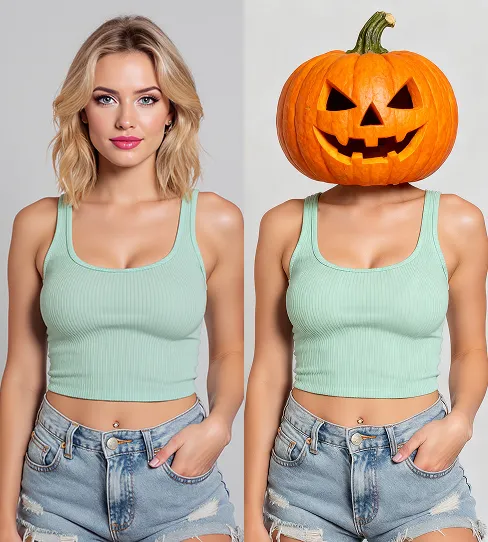
These external before-and-after references show how a wider carved head sits above familiar clothing. Compare head clearance and the neck connection; they do not demonstrate the motion of this preset.
Portrait-to-pumpkin reference
An external before-and-after image compares an adult portrait with a friendly carved pumpkin head on a clothed body.
VideoWeb AI ↗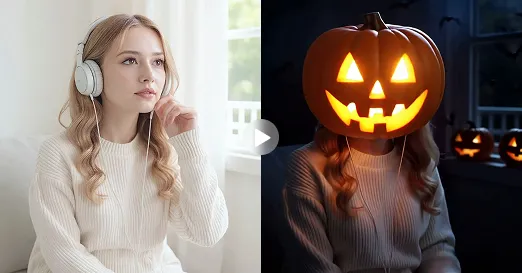
Warm-lit pumpkin comparison
An external comparison pairs a portrait with a candlelit jack-o’-lantern head in warm evening light.
Flyne AI ↗External scene references, not FYP FX-generated results. Your 5-second clip may differ.
Frame the pumpkin before you generate
The useful checks are head clearance before upload and the neck connection after generation.
Frame the neck and stem space
Upload one portrait with the full head, neck and shoulders visible. Check that the preview leaves room above the hair.
Generate the pumpkin change
Confirm the 568-credit cost and generate one take of the leaf-and-sparkle transformation. The carving follows the fixed preset.
Check the pumpkin attachment
Replay the replacement and final tilt. Inspect the neck join, stem clearance, glowing grin and clothing continuity before downloading.
Pumpkin head upload and review questions
An obscured neck or face-only crop gives a weak attachment reference. For a later attempt, use an upright portrait with a clearly visible neck and shoulders.
This tool uses a fixed friendly jack-o’-lantern direction. It has no separate control for the eyes, mouth, carving or glow.
A normal portrait works. A mask, hat or hand covering the jaw may make the head outline less clear for the replacement.
That is the intended change: the human head becomes a carved pumpkin. Check the body, outfit and pose for continuity instead of expecting facial likeness inside the carving.
Generating a new video uses 568 credits. Check the displayed price and balance before starting another attempt.
Prepare a vertical source with extra space above and beside the head before uploading. The video follows the source aspect ratio; a later tight crop can remove the stem.
This preset makes a silent 5-second, 720p clip. Processing can take several minutes; check generation history before repeating a task with uncertain progress.
Give the pumpkin a clear place to sit
Start with a complete head-and-shoulders portrait, then inspect the transition into the carved head.