AI Deep Sea Video Generator: Underwater Photo Effect
Build a calm underwater portrait from one photo. Judge the small shoulder turn and drifting details without losing the original person behind water effects.
Leave space beside the head and shoulders for drifting hair, fabric and bubbles. Choose a relaxed pose with visible eyes. This is a calm float with a small shoulder turn, not a swimming or diving sequence.
568 credits per 5-second video
External scene references, not FYP FX-generated results. Your 5-second clip may differ.
Frame the float before uploading
- Keep the entire head and enough shoulder space for a small turn, with eyes and mouth unobscured.
- Choose hair or fabric that is clearly separated from the background when you want the drift to show.
- Use a relaxed solo pose with simple hand placement; a diving costume or swimming photograph is unnecessary.
Sign in and check your credit balance. View credit plans.
Look for gentle drift, not swimming
- Hair, fabric and bubbles can cross the face; reject a take where they hide the eyes or distort the mouth.
- The fixed scene uses deep-blue water and distant fish. It does not offer fish selection, swimming choreography or underwater sound.
For a TikTok underwater photo animation, preview without sound first. The land-to-water change and gentle float should communicate the idea before you add a soundtrack.
Preset details reviewed by FYP FX ·
Study floating fabric and surface light
These external underwater references illustrate separation between the face, drifting fabric and blue background. Use them to consider calm buoyancy and light from above, rather than expecting the same fish or clothing.
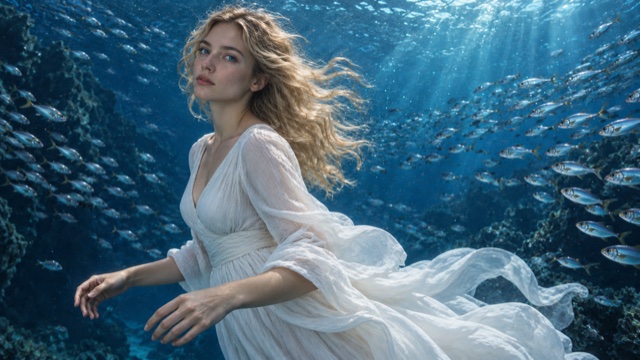
Floating fabric in blue water
A white dress and long hair drift through deep-blue water, with fish around the subject and light from the surface.
SuperMaker ↗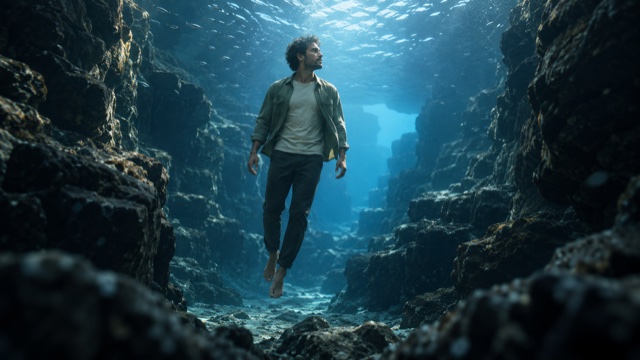
Light from the surface
Soft light from above separates the floating figure from the surrounding blue water and rocks.
SuperMaker ↗External scene references, not FYP FX-generated results. Your 5-second clip may differ.
Create a readable underwater portrait
Keep the face as the focal point when choosing the image and comparing the finished take.
Choose a relaxed land portrait
Upload one JPG or PNG with a clear face and room beside the head and shoulders for drifting details.
Generate the blue-water scene
Check the source-photo aspect ratio and 568-credit cost, then select Generate for the silent 5-second float.
Replay the face through the turn
Look for gentle buoyancy and smooth hair or fabric drift. Check that bubbles stay out of the eyes, then download the take.
AI Deep Sea FAQ
A tight selfie provides a face but leaves little room for the shoulder turn, drifting hair and water. Prefer a looser portrait with clear space around the head and upper body; the output follows the uploaded photo’s shape.
The water details are generated and can move differently in each take. Use a photo with more separation around the face, then review the whole turn. Avoid choosing a result only because its opening frame looks clear.
This tool uses a fixed gentle-float sequence with a small shoulder turn. It does not accept a custom swimming path, full body rotation or diving action. Choose it for a calm underwater portrait rather than an athletic scene.
One generation uses 568 credits for a silent 5-second, 720p clip. The canvas follows your source photo. Compare the displayed balance and input preview before generating; another take uses credits again.
No. The downloaded file is silent. Add your own soundtrack afterward and keep the water movement readable on its own; the preset does not produce bubbles, ambience or music as an audio track.
Try a sharper, evenly lit portrait with less filtering and a smaller initial head angle. Leave room for the shoulder movement. If the issue is an unresolved task rather than the image, check history before requesting another generation.
The preset asks for clear deep-blue water, a few small distant fish and soft sunlight from above. These details can vary and are not selectable. Processing may take several minutes even though the final clip lasts five seconds.
Plan your next underwater take
Check available credits before trying a different crop or portrait for the floating scene.