Make the backward glide readable from the photo
A photo-to-moonwalk TikTok video depends on seeing what the shoes do. Start with both feet fully visible, some floor behind the heels and a standing pose with separated legs. Cropping closer to the face can remove the very movement the viewer needs to see.
Use the Moonwalk Dance tool for the animation. For the definition of the heel-toe sequence, see the moonwalk effect introduction. The checks below focus on the two glides, the switch between supporting feet and the crop of the downloaded edit.
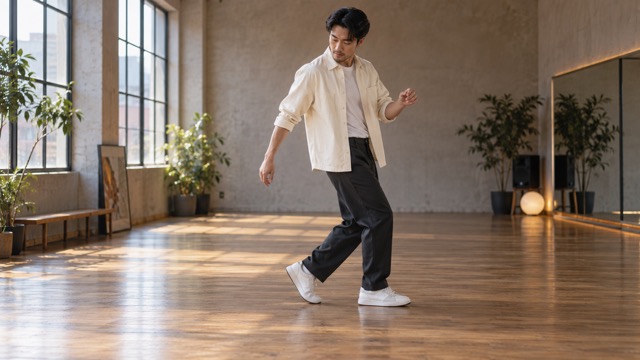
The AI moonwalk effect turns a photo of someone standing still into a short clip where they glide backward with alternating heel-toe footwork. You do not need to learn the dance, film yourself, or set up a stage. Start with one clear full-body photo that shows the face, both shoes, and the floor.
On FYP FX, use AI Moonwalk Dance. The preset creates a silent 5-second, 720p clip for 568 credits, and the aspect ratio follows your photo. Check the effect page for the current settings and cost before generating. This guide covers photo choice, generation, what to check in the result, and how to post it with music.
What the effect creates
Your photo supplies the opening frame. The scene direction asks the person to perform two alternating backward moonwalk glides, keep a relaxed upright posture, and finish in a balanced pose. One foot supports the body on the ball of the foot while the other slides backward flat on the floor, then they switch roles. The effect aims to preserve the person's recognizable face, outfit, setting, and lighting. Facial details, clothing, and the background can still change, so review the full clip before choosing a take.
The scene direction adds dance movement without a celebrity costume change or a reference to a particular song or stage show.
The clip is silent. That is on purpose, so you can pick your own licensed track when you post.
Step 1: Pick a full-body photo with both shoes visible
The source photo needs to explain where the shoes meet the floor. Full-body framing gives the glide room without relying on an invented lower body.
A good photo has:
- One person, sharp and well lit, with a clear face
- The full body in frame, head to shoes
- Both shoes visible and touching the floor
- Some open floor space behind the person, so there is room to glide
A side-on or slightly angled full-body view works well because it shows heel lift and floor contact clearly. Skip close-ups and half-body crops (they hide the feet), group photos, heavy filters, and shots where furniture or other people block the legs.
Only use photos you have permission to use.
Step 2: Upload and generate one test
Open AI Moonwalk Dance.
- Sign in and confirm you have at least 568 credits.
- Upload one JPG or PNG, up to 20 MB, and check the photo preview.
- Select Generate once.
Each run makes one 5-second clip. Five seconds is the video length, not how long generation takes. Allow several minutes for processing. Keep the page open, or check your generation history if progress cannot be confirmed. The dance direction is preset, so there is no custom prompt to fill in.

Start with a single test and save it for comparison before changing the source photo. Each new generation uses credits.
Step 3: Check the footwork, face, and floor
Watch the full clip once, then scrub through the glides.
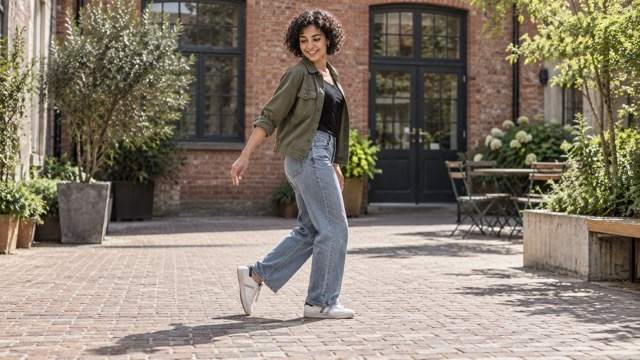
Look for:
- Shoes sliding through the floor or floating above it
- Legs merging or bending the wrong way mid-glide
- Face drift between successive frames
- The person stepping out of frame at the edge of the crop
If the feet look wrong, try a photo with more floor space, both shoes clearly visible, and less clutter around the legs. If the face drifts, try a sharper photo with even lighting on the face. A clearer photo may help, but cannot guarantee clean footwork or an exact likeness.
If generation fails or progress cannot be checked, review your generation history before starting another task. If the task or credit status is unclear, check your balance and contact support before submitting again.
When you are happy with a result, select Download video. If your browser opens the video in a new tab, use the player menu to download or save it before adding music or preparing it for sharing.
Preserve the feet in a moonwalk TikTok edit
The clip has no audio, so add music in TikTok or your editor. Listen for a short beat pattern that fits the two glides, then move the soundtrack to the foot switch you received; the motion is not automatically synchronized to a song.
A common editing problem is losing the shoes to a vertical center crop or a caption at the bottom. Fit the entire body and some floor inside your post, with text above the waist. Replay the two glides at phone size before export. If a tighter crop makes the shoes disappear, keep the wider view and let the backward travel explain the effect. Label the animation as AI-generated.
FAQ
What photo works best for the AI moonwalk?
A sharp full-body photo of one person with a clear face, both shoes visible, and open floor behind them.
Does it include music or a famous song?
No. The clip is silent. Add licensed music when you post. The effect is inspired by the dance style, not a specific song or performance.
Is it a celebrity impersonation?
No. Your photo supplies the person and setting. The effect adds moonwalk-style movement only.
How much does it cost?
Each generation uses 568 credits for one 5-second, 720p video.
Why do the shoes slide together instead of alternating?
Watch for a visible heel lift and a flat sliding foot, then the switch. Crossed legs, a hidden shoe or a confusing floor can make that relationship harder to read. Choose a simpler standing reference if you try another generation; clean alternating motion is not guaranteed.
Make your clip
Pick one full-body photo with both shoes on the floor, open AI Moonwalk Dance, spend 568 credits on one 5-second test, then add your own music and post. For more photo-to-video ideas on FYP FX, try Deep Sea, AI Broom Riding, and AI Carpool Karaoke.